Why Your Internet Speed Test Doesn’t Match Your Plan
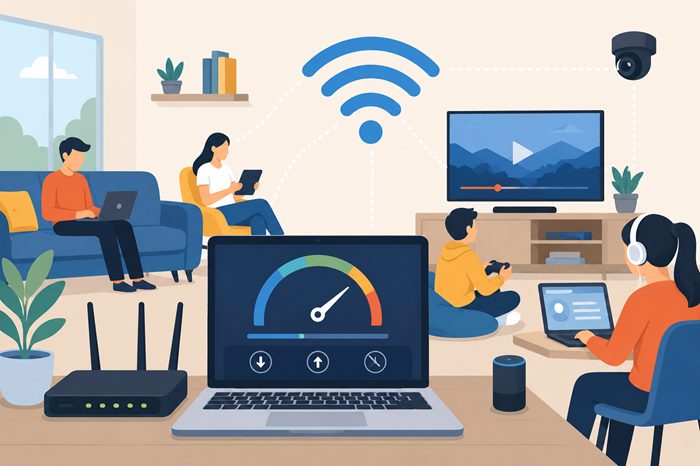
If you’ve ever run a speed test and wondered why the numbers don’t match the internet package you’re paying for, you’re not alone. Many households sign up for high-speed internet expecting flawless performance, only to see slower download speeds, buffering during streaming, or lag while gaming.
The good news is that your provider is not always the problem. Several hidden factors can affect your actual connection speed, from Wi-Fi interference to outdated hardware and network congestion. Understanding these issues can help you get closer to the speeds your provider advertises and improve your overall online experience.
Understanding Advertised Internet Speeds
Internet providers promote plans using “up to” speeds. That phrase matters more than most people realize.
When a provider advertises 500 Mbps or 1 Gig internet, those numbers represent the maximum possible speed under ideal conditions. Real-world performance can fluctuate depending on your location, hardware, device limitations, and the time of day.
For example, your internet plan may support gigabit speeds, but your older router or device may only handle a fraction of that performance. In many cases, the issue lies somewhere between the provider’s network and your connected devices.
This is why running an accurate speed test is essential.
Why Speed Test Results Vary
Internet speed tests are snapshots of your connection at a specific moment. They are affected by multiple variables, and even two tests taken minutes apart may show different results.
Wi-Fi Signal Interference
Wi-Fi is convenient, but it’s also one of the biggest reasons speed tests appear slower than expected.
Walls, furniture, appliances, and even neighboring Wi-Fi networks can weaken your signal. The farther you are from the router, the more speed loss you may experience.
A wired Ethernet connection almost always delivers faster and more stable results compared to wireless testing.
If you want a more reliable reading, try running an internet speed test using a wired connection directly from your modem or router.
Too Many Connected Devices
Modern homes often have dozens of connected devices competing for bandwidth at the same time.
Streaming TVs, gaming consoles, smartphones, smart speakers, cameras, and laptops all consume internet resources. Even background software updates can quietly reduce available speed.
This becomes more noticeable during peak usage hours when multiple family members are online simultaneously.
Network Congestion During Peak Hours
Internet traffic behaves similarly to highway traffic. When more users are online, speeds can slow down temporarily.
Even if you subscribe to a fast package, your provider’s local network may experience congestion during evenings or weekends when demand spikes.
Cable internet users often notice this issue more frequently because bandwidth is shared within neighborhoods.
Your Router Could Be the Problem
Many people overlook the importance of their router.
An outdated router can bottleneck your internet connection even if your provider delivers the correct speeds to your home.
Old Router Technology
Older routers may not support modern Wi-Fi standards like Wi-Fi 6 or advanced gigabit capabilities.
If your router is several years old, it may struggle to keep up with higher-speed internet plans. This is especially true if you recently upgraded your package but kept the same equipment.
Poor Router Placement
Router location matters more than most people think.
Placing a router inside cabinets, behind TVs, or in corners of the house can significantly weaken signal coverage. Central placement in an open area usually produces better results.
Large homes may also benefit from mesh Wi-Fi systems instead of relying on a single router.
Your Devices Have Speed Limits Too
Not every device can achieve maximum internet speeds.
Older smartphones, laptops, tablets, and gaming consoles may have hardware limitations that cap connection performance. Even if your internet package supports 1 Gbps, your device might only support 100 Mbps over Wi-Fi.
Testing multiple devices can help determine whether the slowdown comes from the internet connection itself or the device you’re using.
Background Applications May Be Consuming Bandwidth
Many applications continue using bandwidth without you realizing it.
Cloud backups, automatic updates, video conferencing apps, streaming services, and online gaming downloads can quietly reduce available speeds.
Before running a speed test, close unnecessary applications and disconnect devices that are actively using the internet.
You can also compare results at different times of day to identify patterns and determine whether congestion or device activity is affecting performance.
Understanding Download vs Upload Speeds
Many users focus only on download speed, but upload speed matters too.
Download speed affects streaming, browsing, and downloading files. Upload speed impacts video calls, cloud storage, gaming, and live streaming.
Some internet providers offer asymmetrical connections, meaning download speeds are much faster than upload speeds. Fiber internet plans often provide more balanced performance.
When evaluating your connection, it’s important to understand internet speed, latency, and jitter because all three influence real-world internet quality.
Latency Can Affect Performance Even With Fast Speeds
A connection can show high download speeds and still feel slow.
That usually points to latency issues.
Latency refers to the delay between your device and the server you’re communicating with. High latency can cause lag during gaming, frozen video calls, and delayed website loading.
This is especially important for gamers and remote workers who rely on real-time communication.
Modem Compatibility Matters
Your modem also plays a critical role in overall internet performance.
Some older modems cannot support modern speed tiers, especially if you recently upgraded your package.
For cable internet users, DOCSIS 3.1 modems generally perform better than older DOCSIS 3.0 models.
Always verify that your modem is approved by your provider and supports your subscribed speed tier.
ISP Throttling and Data Prioritization
In some cases, internet providers may manage network traffic during periods of heavy demand.
This process, sometimes called throttling or prioritization, can temporarily affect specific online activities such as streaming or gaming.
While not always common, it can contribute to speed inconsistencies depending on your provider and plan type.
The Difference Between Mbps and Real-World Performance
Many users assume higher Mbps automatically means a better experience.
In reality, internet quality depends on how you use your connection.
A family streaming multiple 4K videos while gaming online will require more bandwidth than a single user checking emails and browsing websites.
Understanding what is truly considered fast internet can help you avoid overpaying for unnecessary speed tiers.
How to Run a More Accurate Internet Speed Test
If you want more reliable test results, follow these best practices:
Use a Wired Connection
Connect directly to your modem or router using Ethernet whenever possible.
Restart Your Equipment
Reboot your modem and router before testing to clear temporary network issues.
Disconnect Other Devices
Pause downloads, streaming, and gaming on other devices during the test.
Test Multiple Times
Run tests throughout the day to compare consistency and identify peak-hour slowdowns.
Use Trusted Testing Tools
Using a reliable internet connection speed test can help you better understand your actual performance and whether your network setup needs improvement.
When It Might Be Time to Upgrade Your Plan
Sometimes your internet plan simply no longer matches your household demands.
More connected devices, remote work, online classes, cloud gaming, and 4K streaming all increase bandwidth requirements.
Before upgrading your service, it helps to understand your actual internet speed needs and whether your current setup is capable of delivering the performance you expect.
If your speed tests consistently show performance issues after troubleshooting your equipment, it may be worth considering a faster package.
Some households compare options such as a spectrum internet speed test to evaluate provider performance in their area before switching plans.
Others may explore whether a spectrum internet plan offers enough bandwidth for growing household usage.
In competitive markets, users also compare providers like an xfinity internet plan, a verizon internet plan, or a comcast internet plan to determine which service delivers the best reliability and speed consistency.
Choosing the right internet plan for home depends on your number of users, connected devices, and daily online activities.
Signs Your Home Network Needs Improvement
Sometimes the issue isn’t your provider at all. Your home network may simply need optimization.
Watch for these warning signs:
Dead Wi-Fi zones in certain rooms
Frequent buffering during streaming
Slow speeds only on wireless devices
Lag during online gaming
Dropped Zoom or video calls
Slow performance when multiple users are online
Upgrading routers, improving placement, or switching to mesh networking can dramatically improve your experience without changing providers.
Final Thoughts
Internet speed tests don’t always tell the full story. While your internet provider plays a role, many performance issues stem from equipment limitations, Wi-Fi interference, device capability, and network congestion inside your own home.
Understanding how these factors work together can help you troubleshoot slow connections more effectively and avoid paying for speeds you may not actually need.
Instead of focusing only on advertised Mbps, pay attention to overall stability, latency, coverage, and how your internet performs during your everyday activities. A properly optimized network often delivers a better experience than simply upgrading to a more expensive plan.
FAQs
Why is my internet speed slower than my plan?
Wi-Fi interference, outdated hardware, and network congestion are common causes.
Does router placement affect internet speed?
Yes, poor router placement can weaken Wi-Fi coverage and reduce performance.
Should I test internet speed using Wi-Fi or Ethernet?
Ethernet provides more accurate and stable speed test results.
Can too many devices slow down my internet?
Yes, multiple connected devices share available bandwidth and can reduce speeds.
How often should I run a speed test?
Testing at different times of day helps identify performance patterns and congestion.
Related Posts
 Technology
Wifi
mobile phone plans
Technology
Wifi
mobile phone plans
What Is a Mobile Hotspot and How Does It Work?
A mobile hotspot is a portable feature or device that converts a cellular data connection (like 4G LTE or 5G) into a private Wi-Fi network
 Broadband Deals
cable deal
Broadband Deals
cable deal
Xfinity Cable Package Deals That Actually Deliver Value
Discover the best Xfinity cable package deals, compare internet and TV bundles, understand pricing, and choose the right plan for your home and budget.
 Broadband Deals
What Is TDS Internet and Is It Right for Your Home?
Learn what TDS Internet is, how it works, available plans, pricing, speeds, benefits, and how it compares with other internet providers.
 Internet Bundles
Bundle Internet, TV, and Phone Without Overpaying
Learn how to bundle internet, TV, and phone services for the best value. Compare plans, avoid hidden fees, and choose the right package for your home.
 Broadband Deals
cable deal
cheap internet deals
Broadband Deals
cable deal
cheap internet deals
Chicago Neighborhood Internet Guide for Better Connectivity
Explore internet options across Chicago neighborhoods, compare providers, understand speeds, costs, and find the best broadband solution.