Boost Your 5G Home Internet Speed at Home
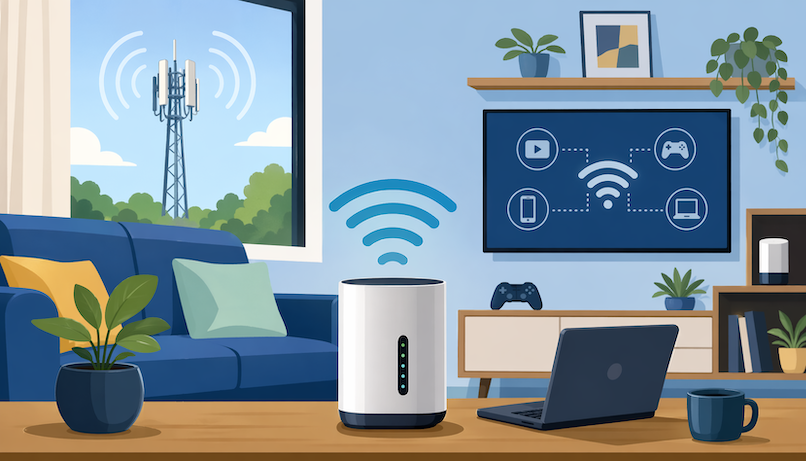
5G home internet can feel fast, flexible, and surprisingly simple when everything is working well. But when your connection slows down, buffers during streaming, or drops during video calls, it can quickly become frustrating.
The good news is that many 5G home internet speed issues are fixable. You may not need a new plan right away. In many cases, better router placement, fewer signal blockers, updated equipment, and smarter Wi-Fi habits can make your connection noticeably faster.
This guide explains how to boost your 5G home internet speed, improve reliability, reduce lag, and get more value from your current setup.
Why 5G Home Internet Speed Changes So Often
Unlike fiber or cable internet, 5G home internet depends heavily on wireless signal strength. Your gateway connects to nearby 5G towers, then sends Wi-Fi throughout your home.
That means your speed can change based on tower distance, network congestion, weather, building materials, router location, and how many devices are online.
During busy hours, speeds may dip because more people in your area are using the same network. At other times, your connection may feel much faster because the tower is less congested.
This is normal for wireless home internet, but it does not mean you have to accept poor performance. Small adjustments can make a big difference.
Start With a Simple Internet Speed Test
Before changing anything, run a speed test. This gives you a baseline so you can tell whether your adjustments are actually helping.
Test your connection near the 5G gateway first. Then test again from rooms where you usually stream, work, or game.
Pay attention to three numbers:
Download speed affects streaming, browsing, and downloading files.
Upload speed affects video calls, cloud backups, and sending large files.
Ping or latency affects gaming, video meetings, and how responsive your connection feels.
Run tests at different times of day. Morning, afternoon, and evening results can look very different with 5G home internet.
Place Your 5G Gateway Near a Strong Signal
Router placement is one of the easiest ways to improve 5G home internet speed. Your gateway needs a strong connection to the outside 5G network before it can deliver strong Wi-Fi inside your home.
Place the gateway near a window, preferably facing the direction of the nearest 5G tower. Higher locations often work better, such as a shelf, second-floor window, or open area away from furniture.
Avoid putting the gateway inside cabinets, behind TVs, near thick walls, or on the floor. These spots can weaken both the 5G signal and the Wi-Fi signal.
If your gateway has a signal strength indicator in its app, move it around slowly and check where the signal improves. Even a few feet can matter.
Keep the Gateway Away From Signal Blockers
5G signals can be blocked or weakened by common household materials. Concrete walls, brick, metal roofing, mirrors, large appliances, and tinted windows may reduce performance.
If your home has thick walls or multiple floors, the gateway may work better near an exterior wall instead of the center of the house.
You should also keep it away from microwaves, cordless phones, baby monitors, Bluetooth speakers, and other electronics that may interfere with Wi-Fi.
A clean, open space gives your gateway the best chance to perform well.
Restart Your 5G Gateway Regularly
A quick restart can clear temporary network issues, refresh the connection, and help your gateway reconnect to a stronger signal.
Unplug the gateway, wait about 30 seconds, then plug it back in. Give it a few minutes to reconnect before testing the speed again.
This is especially helpful if your internet suddenly becomes slow after working fine earlier.
You do not need to restart it every day, but doing it when speeds drop can often solve minor problems quickly.
Update Your Gateway Firmware
Your 5G gateway runs software called firmware. Updates can improve performance, security, compatibility, and connection stability.
Most gateways update automatically, but it is still worth checking your provider’s app or device settings. If an update is available, install it when you are not in the middle of work, streaming, or gaming.
Firmware updates may also fix bugs that cause random slowdowns or Wi-Fi drops.
Use the Right Wi-Fi Band
Most modern gateways support 2.4 GHz and 5 GHz Wi-Fi bands. Some newer devices also support Wi-Fi 6 or Wi-Fi 6E.
The 2.4 GHz band reaches farther but is usually slower. It is useful for smart home devices, older phones, and rooms farther from the router.
The 5 GHz band is faster but has a shorter range. It works best for streaming, gaming, video calls, and laptops close to the gateway.
If your device is near the gateway, connect it to the 5 GHz Wi-Fi network when possible. If you are far away, 2.4 GHz may be more stable.
Reduce the Number of Connected Devices
Every connected device uses a piece of your home network. Phones, laptops, tablets, smart TVs, security cameras, speakers, gaming consoles, and smart appliances can all compete for bandwidth.
Even devices sitting idle may download updates, sync files, or run background tasks.
Disconnect devices you are not using. Pause large downloads during video calls. Turn off automatic cloud backups during peak hours.
This helps your most important devices get more available speed when you need it.
Move High-Bandwidth Devices Closer
Streaming in 4K, online gaming, and large file transfers need a strong connection. If those devices are far from your gateway, performance can suffer.
Try moving your smart TV, console, or work laptop closer to the gateway. If that is not possible, consider using a mesh Wi-Fi system or Wi-Fi extender.
A stronger indoor Wi-Fi connection will not fix a weak outdoor 5G signal, but it can solve slow speeds caused by poor coverage inside the home.
Use Ethernet When Possible
If your 5G gateway has Ethernet ports, use a wired connection for devices that need steady performance.
Ethernet is usually more reliable than Wi-Fi because it avoids wireless interference. It is a good option for gaming consoles, desktop computers, smart TVs, and workstations.
A wired connection can reduce lag, improve stability, and make speeds more consistent.
Even if your 5G internet speed varies, Ethernet helps make sure your device gets the best connection available from the gateway.
Check for Network Congestion
If your 5G home internet is fast during the morning but slow every evening, network congestion may be the reason.
This happens when many people nearby are using the same cellular network at the same time. Streaming, gaming, remote work, and mobile usage can all increase demand.
You may not be able to control tower congestion, but you can work around it.
Schedule large downloads overnight or early in the morning. Avoid updating games or backing up huge files during peak evening hours. Use lower streaming quality when the network feels crowded.
Choose the Best Spot Through Trial and Error
Finding the best gateway location may take a little testing. Do not assume the first spot is the best one.
Try several locations near windows and exterior walls. After each move, run a speed test and note the results.
Look for the best balance of download speed, upload speed, ping, and reliability.
Sometimes the fastest location is not the most stable. If one spot gives slightly lower speed but fewer drops, it may be the better choice for daily use.
Understand the Difference Between 4G, 5G, and Future Networks
Not all wireless internet connections are the same. Some areas may switch between 4G LTE and 5G depending on signal strength, tower availability, and device support.
A 5G connection can be faster, but a strong 4G LTE signal may sometimes feel more stable than a weak 5G signal. That is why placement matters so much.
If you want a clearer breakdown of how wireless generations compare, this simple network speed comparison explains the differences in a way that is easy to understand.
Knowing how these networks work helps you set realistic expectations for your home internet performance.
Consider Whether Fiber or 5G Fits Your Home Better
5G home internet is convenient because it is wireless, easy to install, and often available without complicated wiring. For many households, that is a major advantage.
However, fiber internet may offer more consistent speeds, especially for heavy users. Fiber is often better for large households, competitive gaming, frequent uploads, and work setups that need stable performance all day.
Still, 5G can be a strong choice for renters, smaller households, backup internet, and areas where wired options are limited.
The best choice depends on your location, budget, usage, and available providers.
Upgrade Your Hotspot or Gateway Device
Older gateways may not support the latest 5G bands, Wi-Fi standards, or performance features. If your equipment is outdated, your speed may be limited even if your provider’s network is strong.
A newer gateway may offer better antennas, stronger Wi-Fi coverage, improved signal handling, and faster device support.
Before upgrading, check whether your current device supports your provider’s best available 5G network in your area.
If you are using a mobile hotspot instead of a full home internet gateway, choosing the right device matters even more.
Improve Wi-Fi Coverage in Larger Homes
A fast 5G signal does not always mean every room will have fast Wi-Fi. Large homes, multi-story layouts, thick walls, and long hallways can weaken indoor coverage.
If your speed is good near the gateway but poor in bedrooms, offices, or living areas, your issue may be Wi-Fi coverage rather than 5G signal.
A mesh Wi-Fi system can help spread the signal evenly across your home. It is usually better than a basic extender because mesh systems manage the connection more smoothly.
Place mesh nodes in open spaces between the gateway and weak-signal areas. Avoid hiding them behind furniture or inside cabinets.
Secure Your Wi-Fi Network
An unsecured or weakly protected Wi-Fi network can slow you down if neighbors or unknown devices connect without permission.
Use a strong Wi-Fi password. Avoid simple passwords like your name, phone number, address, or “password123.”
Choose WPA2 or WPA3 security if your gateway supports it. Also, change the default network name and admin password if possible.
Review connected devices in your provider’s app or router settings. Remove anything you do not recognize.
A secure network protects both your speed and your privacy.
Manage Streaming Quality
Streaming video can use a lot of bandwidth, especially in 4K. If multiple people stream at the same time, your 5G home internet speed may feel slower on other devices.
Lowering video quality from 4K to HD can make a big difference without ruining the viewing experience.
This is especially useful during peak evening hours or when someone else is on a video call.
You can also download shows during faster times of day, then watch them later without using live bandwidth.
Keep Background Apps Under Control
Many apps use internet in the background. Cloud storage, software updates, game launchers, messaging apps, and security programs may download or upload data without you noticing.
On computers, check which apps are using network activity. Pause large updates when you need speed for work or calls.
On phones, disable automatic updates over Wi-Fi if they are causing slowdowns.
This small habit can make your internet feel faster during important tasks.
Use Quality of Service Settings If Available
Some routers and gateways include Quality of Service, often called QoS. This feature lets you prioritize certain devices or activities.
For example, you may prioritize your work laptop during office hours or your gaming console during online matches.
Not every 5G gateway includes advanced QoS settings, but it is worth checking.
When used correctly, QoS can reduce lag and make your connection feel smoother even when several devices are online.
Compare Internet Plans in Your Area
Sometimes, the issue is not your setup. Your plan, provider coverage, or local tower conditions may simply not match your household’s needs.
If you have already optimized placement, updated your device, reduced interference, and tested different times of day, it may be time to compare available plans.
You can search internet plans to see whether another provider, speed tier, or connection type may work better for your home.
This is especially important if your household streams often, works remotely, games online, or uses many connected devices at once.
Signs You May Need a Better Internet Plan
You may need a new plan if your speed is consistently below what your household needs, even after troubleshooting.
Common signs include frequent buffering, dropped video calls, slow uploads, high ping, and poor performance when more than one person is online.
A single-person household may be fine with moderate speeds. A family with multiple streamers, gamers, and remote workers will usually need more bandwidth and better reliability.
Your internet plan should match how your home actually uses the connection, not just the advertised speed.
Quick Checklist to Boost 5G Home Internet Speed
Start with the basics before spending money on upgrades.
Move your gateway near a window or exterior wall.
Place it higher and away from electronics.
Restart the gateway when speeds suddenly drop.
Update firmware through your provider’s app.
Use 5 GHz Wi-Fi for nearby devices.
Disconnect unused devices.
Use Ethernet for gaming, work, or streaming.
Test speeds at different times of day.
Consider mesh Wi-Fi for larger homes.
Compare plans if your current service stays slow.
These steps help you identify whether the problem is signal strength, Wi-Fi coverage, device overload, congestion, or the plan itself.
Conclusion
Boosting your 5G home internet speed starts with understanding how wireless internet works. Because your gateway depends on both outdoor 5G signal and indoor Wi-Fi coverage, small changes can have a real impact.
Place your gateway carefully, reduce interference, update your equipment, manage connected devices, and test your speed regularly. If your connection still struggles, comparing available internet plans may be the most practical next step.
5G home internet can be fast and convenient, but it performs best when your setup supports it. With the right placement, habits, and plan, you can enjoy smoother streaming, better video calls, faster browsing, and a more reliable home connection.
FAQ
Why is my 5G home internet slow?
Your 5G home internet may be slow because of weak signal, poor gateway placement, network congestion, too many connected devices, Wi-Fi interference, or outdated equipment.
Start by moving your gateway near a window, restarting it, and testing speeds in different rooms.
Where should I place my 5G home internet gateway?
Place your gateway near a window, on a higher surface, and away from thick walls, metal objects, appliances, and electronics.
The best location is usually where it gets the strongest 5G signal from outside while still covering your main indoor spaces.
Does bad weather affect 5G home internet?
Weather can sometimes affect wireless signals, especially during heavy rain or storms. However, building materials, tower distance, and network congestion usually have a bigger impact on everyday performance.
Is 5G home internet good for gaming?
5G home internet can work for gaming, but performance depends on ping, signal strength, and network stability.
For the best gaming experience, use Ethernet if your gateway supports it and place the gateway where it gets the strongest signal.
How can I make my 5G internet more stable?
Improve stability by placing the gateway in an open location, reducing interference, updating firmware, using Ethernet for important devices, and limiting heavy downloads during peak hours.
Should I upgrade my 5G gateway?
You should consider upgrading if your gateway is old, does not support newer 5G bands, has weak Wi-Fi coverage, or struggles with multiple devices.
A newer device may improve both speed and reliability.
Is 5G home internet better than fiber?
5G home internet is easier to install and works well for many homes, especially where wired internet is limited. Fiber is usually more consistent and better for heavy usage, large households, and frequent uploads.
The better option depends on what is available in your area and how your household uses the internet.
Related Posts
 cheap internet deals
cheap internet plans
cheap internet offers
cheap internet deals
cheap internet plans
cheap internet offers
Which ISP Offers the Best Long-Term Price Stability?
Compare ISPs with the most stable long-term pricing. Learn how to avoid bill increases, evaluate plans, and choose affordable internet service.
 Broadband Installation
How to Get Internet Without a Phone Line or Cable TV
Learn how to get internet without a phone line or cable TV. Compare fiber, cable, wireless, DSL, and satellite options for affordable connectivity.
 Internet Bundles
Broadband Deals
Internet Bundles
Broadband Deals
How to Find the Least Expensive ISP Without Losing Speed
Learn how to find the least expensive ISP in your area without sacrificing speed, reliability, or value. Compare plans and avoid hidden fees.
 Internet Bundles
Broadband Deals
Internet Bundles
Broadband Deals
Choosing the Best Internet Provider for Your Apartment
Learn how to choose the best internet provider for your apartment by comparing speeds, pricing, reliability, customer service, and plans.
 cable deal
Broadband Deals
Internet Bundles
cable deal
Broadband Deals
Internet Bundles
Best Dish Network Packages for Current Customers in 2026
Discover the best Dish Network packages for current customers, compare plans, explore upgrades, and find the right TV package for your needs.