What Is a Mobile Hotspot and How Does It Work?
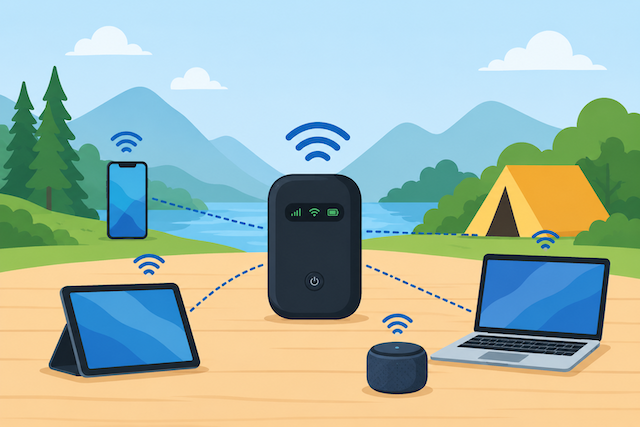
Staying connected has become essential, whether you’re working remotely, traveling, attending online classes, or simply browsing the web. There are times when traditional Wi-Fi isn’t available, but that doesn’t mean you have to go offline. A mobile hotspot lets you share your smartphone’s internet connection with other devices, giving you access to the internet almost anywhere you have cellular coverage.
For many people, a mobile hotspot is a convenient backup when home internet goes down. Others rely on it while traveling or working on the road. Understanding how mobile hotspots work, their advantages, and their limitations can help you decide whether they’re the right solution for your internet needs.
What Is a Mobile Hotspot?
A mobile hotspot is a feature built into most modern smartphones that allows your phone to act as a portable Wi-Fi router. Instead of connecting to a traditional broadband connection, your phone uses its mobile data network to provide internet access to devices such as laptops, tablets, smart TVs, and gaming consoles.
Once enabled, nearby devices can connect to your phone’s Wi-Fi network just as they would connect to a home router.
Most cellular providers include hotspot functionality with their mobile plans, although the amount of hotspot data available depends on your specific subscription. In many cases, hotspot usage counts toward your monthly mobile data allowance. Understanding how to manage your monthly data allowance can help you avoid unexpected slowdowns or additional charges.
How Does a Mobile Hotspot Work?
When you enable the hotspot feature on your smartphone, your phone creates a secure wireless network using its cellular internet connection. Other Wi-Fi-enabled devices can then connect to that network using the hotspot name and password you configure.
The process is simple:
Open your phone’s Settings.
Enable Personal Hotspot or Mobile Hotspot.
Set a secure Wi-Fi password.
Connect your laptop, tablet, or another device using the hotspot credentials.
Your smartphone essentially performs the same job as your home’s Wi-Fi router—it receives internet access from your mobile carrier and distributes that connection wirelessly to other devices.
Because your hotspot relies entirely on your cellular signal, the quality of your internet connection depends on your mobile network coverage and signal strength.
Benefits of Using a Mobile Hotspot
A mobile hotspot offers flexibility that traditional internet connections cannot match. Whether you’re away from home or dealing with an unexpected internet outage, it can keep you connected without needing additional equipment.
Internet Anywhere You Have Cellular Coverage
One of the biggest advantages is portability. As long as your smartphone has a reliable cellular signal, you can connect your other devices almost anywhere.
This makes hotspots particularly useful for:
Business travel
Remote work
Road trips
Outdoor events
Temporary internet during service outages
No Public Wi-Fi Required
Public Wi-Fi networks often come with security risks and inconsistent performance. Using your own mobile hotspot provides a more private connection because you’re using your personal cellular network instead of sharing an open public network.
Easy to Set Up
Most smartphones allow you to enable hotspot mode in less than a minute. There are no cables to install, no routers to configure, and no complicated setup process.
Helpful as a Backup Internet Connection
Many households use mobile hotspots as an emergency backup. If your home internet experiences an outage, a hotspot can keep your essential devices online until service is restored.
Limitations of Mobile Hotspots
Although mobile hotspots are incredibly convenient, they aren’t designed to replace high-speed home internet for every situation.
Data Limits
Many carriers place limits on hotspot data usage. Even if your mobile plan includes unlimited data, hotspot usage may have a separate cap before speeds are reduced.
Streaming several movies, downloading large files, or attending hours of video meetings can quickly consume your hotspot allowance.
Slower Speeds During Congestion
Because hotspots rely on cellular networks, speeds may vary depending on:
Network congestion
Signal strength
Distance from the nearest cell tower
Your mobile carrier
During busy hours, internet performance may be noticeably slower than your home broadband connection.
Battery Drain
Running a hotspot continuously requires significant power. Your phone’s battery will drain much faster than normal, especially when multiple devices are connected.
If you plan to use a hotspot for several hours, keeping your phone plugged into a charger is highly recommended.
Does Using a Mobile Hotspot Cost Extra?
In many cases, enabling your hotspot doesn’t involve a separate fee. Instead, hotspot usage simply consumes data from your existing mobile plan.
However, some carriers offer:
Dedicated hotspot data limits
Premium hotspot add-ons
Unlimited phone data with limited hotspot speeds
Additional charges for exceeding hotspot allowances
Before relying on your hotspot regularly, review your carrier’s policy so you understand how much hotspot data is included with your plan.
Is a Mobile Hotspot Fast Enough?
The answer depends on how you plan to use it.
For everyday activities such as:
Email
Web browsing
Video calls
Online banking
Document editing
a hotspot often performs very well.
However, demanding activities such as:
4K video streaming
Large software downloads
Competitive online gaming
Multiple simultaneous users
can expose the limitations of a cellular connection.
Several factors influence hotspot speed, including your phone’s hardware, your carrier, network traffic, and your available signal strength.
You should also understand why download and upload speeds matter for different online activities, especially if you frequently upload files, participate in video conferences, or stream content.
How Many Devices Can Connect?
Most smartphones allow several devices to connect simultaneously, although the exact number varies by manufacturer and carrier.
Common limits range from 5 to 15 connected devices.
Technically, multiple devices can connect at the same time, but every additional connection shares the same internet bandwidth. This means speeds decrease as more users begin browsing, streaming, or downloading.
For the best performance, limit hotspot connections to only the devices you actively need.
Mobile Hotspot vs. Home Internet
While both provide internet access, they serve different purposes.
If your internet usage is relatively light and you’re rarely online, a hotspot may occasionally meet your needs.
However, households with multiple users, smart home devices, streaming services, remote work, or online gaming will almost always benefit from a dedicated home internet connection.
Tips for Getting Better Mobile Hotspot Performance
To maximize your hotspot experience, consider these best practices.
Place Your Phone Where Signal Is Strong
Move closer to windows or open areas where your phone receives stronger cellular reception.
Protect Your Hotspot with a Password
Always use WPA2 or WPA3 security with a strong password to prevent unauthorized users from consuming your data.
Limit Connected Devices
Disconnect devices that aren’t actively being used to improve speed for the ones that matter most.
Monitor Your Data Usage
Video streaming and cloud backups can consume large amounts of data without you realizing it.
Regularly checking your usage helps prevent slowdowns once you reach your monthly limit.
Keep Your Phone Charged
Hotspot mode uses considerably more battery power than normal smartphone use, so keep a charger or power bank nearby during extended sessions.
When Should You Use a Mobile Hotspot?
A mobile hotspot works best when you need temporary internet access rather than a permanent replacement for broadband.
It’s an excellent solution for:
Traveling for business or vacation
Working remotely from cafés or hotels
Internet outages at home
Students studying away from campus
Emergency internet access
Short-term connectivity for tablets or laptops
For continuous streaming, gaming, smart home devices, and multiple users, a dedicated home internet connection remains the better long-term choice.
Final Thoughts
A mobile hotspot is one of the most useful features available on today’s smartphones. It offers a quick, convenient way to connect laptops, tablets, and other Wi-Fi-enabled devices whenever traditional internet isn’t available.
While hotspots provide excellent flexibility, they’re best viewed as a temporary or backup internet solution rather than a full replacement for home broadband. Data limits, battery consumption, and fluctuating cellular speeds can become challenges during heavy use.
If you regularly work from home, stream high-definition content, or connect multiple devices every day, investing in a reliable home internet service will provide better speed, consistency, and overall value. For those moments when you’re on the move or facing an unexpected outage, however, a mobile hotspot remains an incredibly practical tool.
Frequently Asked Questions
Is a mobile hotspot the same as Wi-Fi?
No. Wi-Fi is the wireless technology that connects devices, while a mobile hotspot uses your phone’s cellular data connection to create a Wi-Fi network.
Can I use my mobile hotspot instead of home internet?
You can for light internet use, but heavy streaming, gaming, remote work, and multiple connected devices usually require a dedicated home internet connection.
Does using a hotspot consume mobile data?
Yes. Every device connected to your hotspot uses data from your mobile plan unless your carrier provides separate hotspot data.
Is a mobile hotspot secure?
Yes, provided you use a strong password and enable the security settings available on your phone.
Why is my hotspot slow?
Slow speeds are often caused by weak cellular signals, network congestion, too many connected devices, or reaching your hotspot data limit.
Can smart TVs and gaming consoles connect to a hotspot?
Yes, but they often consume large amounts of data and may not perform as well as they would on a traditional broadband connection.
Related Posts
 Broadband Deals
cable deal
Broadband Deals
cable deal
Xfinity Cable Package Deals That Actually Deliver Value
Discover the best Xfinity cable package deals, compare internet and TV bundles, understand pricing, and choose the right plan for your home and budget.
 Broadband Deals
What Is TDS Internet and Is It Right for Your Home?
Learn what TDS Internet is, how it works, available plans, pricing, speeds, benefits, and how it compares with other internet providers.
 Internet Bundles
Bundle Internet, TV, and Phone Without Overpaying
Learn how to bundle internet, TV, and phone services for the best value. Compare plans, avoid hidden fees, and choose the right package for your home.
 Broadband Deals
cable deal
cheap internet deals
Broadband Deals
cable deal
cheap internet deals
Chicago Neighborhood Internet Guide for Better Connectivity
Explore internet options across Chicago neighborhoods, compare providers, understand speeds, costs, and find the best broadband solution.
 Technology
Wifi
Technology
Wifi
7 Reasons You Can’t Connect to the Internet (and How to Fix Them)
Learn the 7 most common reasons you can’t connect to the internet and discover practical troubleshooting steps to restore your Wi-Fi or wired connection fast.