Why’s My Internet Slower Than What I’m Paying For?
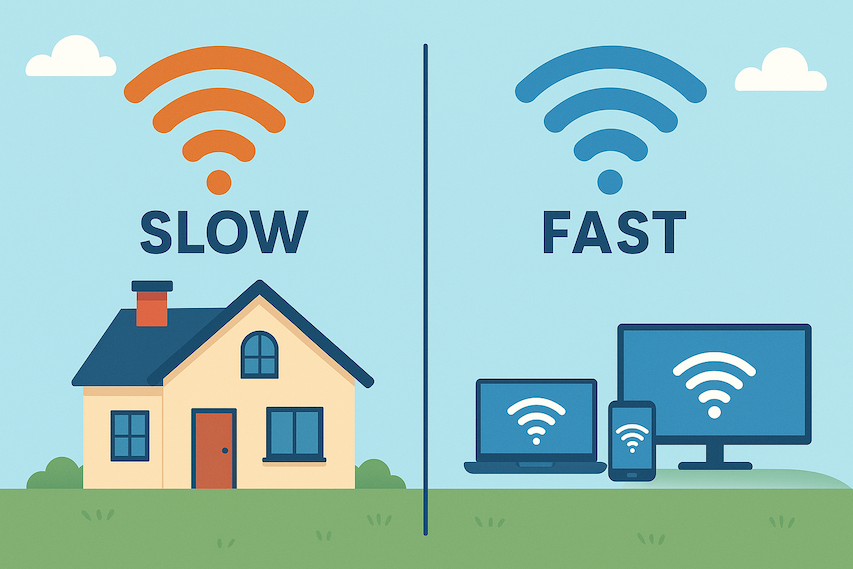
You’re paying for a high-speed internet plan, yet everyday usage tells a different story. Pages load slowly, video calls lag, and streaming buffers at the worst moments. When you run an internet speed test, the numbers rarely match what your plan promises.
This disconnect is more common than most people realize. While providers advertise maximum speeds, real-world internet performance depends on multiple variables—many of which happen inside your home or along the route your data travels before it reaches you.
Understanding why this happens puts you back in control. Once you know what affects your connection, it becomes easier to fix the problem or decide when it’s time to make a change.
How Internet Speeds Actually Work
Internet plans are marketed using “up to” speeds. That phrasing matters. The number you pay for reflects the maximum bandwidth available under ideal conditions, not a guaranteed constant speed.
Your actual connection speed is influenced by:
- Your home network setup
- The type of connection you’re using
- Network congestion in your area
- Distance between you and the data source
Even with premium service, these variables can reduce the speed that reaches your device at any given moment.
Hardware Limitations Inside Your Home
One of the most overlooked causes of slow internet is outdated equipment. Routers, modems, and network adapters all have performance limits.
A modern fiber internet connection can deliver extremely fast speeds, but an older router may not be capable of distributing that bandwidth efficiently. The same applies to older laptops, desktops, and smart devices that rely on aging network chips.
Wireless standards matter. Devices using older Wi-Fi protocols often struggle with higher throughput, even when the connection itself is fast.
Keeping your hardware updated ensures your devices aren’t silently bottlenecking your connection.
Distance From ISP Infrastructure
Physical distance still plays a role in internet performance. While fiber connections maintain speed over longer distances, other technologies are more sensitive to signal loss.
If your home relies on cable or DSL infrastructure, speed can degrade as the signal travels from your provider’s nearest hub. This is especially noticeable in areas where network upgrades haven’t kept pace with growing demand.
Checking your connection regularly helps reveal whether this distance-related drop is affecting you. Many users review their speeds at different times of day to understand how consistent their service really is, similar to how people review internet speed at home to spot patterns over time.
Shared Bandwidth and Neighborhood Congestion
Internet connections don’t always operate in isolation. In many areas, bandwidth is shared among multiple households. When demand spikes, available speed gets divided.
This becomes noticeable in apartment buildings, dense neighborhoods, and residential zones where many users rely on the same infrastructure. Streaming, gaming, and large downloads happening simultaneously can slow everyone down.
Congestion doesn’t mean your plan is broken—it means the network is busy.
Peak Usage Hours Affect Speed
Even the best connections slow down during peak hours. Evening periods, when most people are home and online, tend to see heavier usage.
Cable internet users are particularly affected because local bandwidth is shared. During peak times, speeds often dip below advertised rates, then recover later at night or early morning.
Tracking performance across different times of day helps determine whether peak congestion is the main issue.
ISP Throttling and Traffic Management
Some providers manage network traffic by slowing specific activities. Streaming video, cloud backups, and large downloads may be deprioritized during high-demand periods.
This practice, commonly called throttling, isn’t always disclosed clearly. One way people identify it is by comparing speeds with and without a secure connection like a VPN, which can mask the type of traffic being sent.
If speeds improve noticeably when traffic is encrypted, network management may be influencing your experience.
Server Location and Routing Delays
Not all slowdowns originate from your ISP. The physical location of the website or service you’re accessing also matters.
Data traveling across continents passes through multiple networks before reaching you. Each handoff introduces delay. Even with fast internet, accessing distant servers can feel slower than local ones.
This explains why some websites load instantly while others lag, despite using the same connection.
Background Apps and Connected Devices
Modern homes often have dozens of devices connected at once. Smart TVs, phones, tablets, security cameras, and smart appliances all consume bandwidth—even when not actively in use.
Background processes like cloud syncing, system updates, and app refreshes quietly compete for speed. Over time, these small demands add up and reduce available bandwidth for active tasks.
Checking network usage and limiting unnecessary background activity can restore noticeable speed improvements.
Wi-Fi Configuration and Signal Interference
Wi-Fi performance depends heavily on configuration. Congested channels, outdated firmware, or poor router placement can weaken your signal.
Walls, furniture, and nearby networks interfere with wireless transmission. Testing your connection through a wired Ethernet cable can help isolate whether the issue lies with Wi-Fi or the connection itself.
Running a direct speed test often reveals whether wireless interference is causing the slowdown.
Temporary Network Maintenance or Outages
Sometimes the issue isn’t permanent. Providers regularly perform maintenance that can reduce speeds temporarily.
Checking service status updates can confirm whether slowdowns are related to ongoing work. These issues usually resolve on their own once maintenance is complete.
When Your Internet Plan No Longer Fits Your Needs
Internet usage evolves. What worked a few years ago may no longer be enough for today’s demands.
Remote work, 4K streaming, cloud services, and multiple users all increase bandwidth needs. If your household consistently hits speed limits despite optimized equipment and setup, a higher-tier plan may be justified.
Providers offering fiber-based services generally deliver more consistent performance than older connection types.
Making Sure You’re Getting What You Pay For
Advertised speeds represent potential, not guarantees. Real-world performance depends on how well your setup aligns with your provider’s infrastructure and how the network is used throughout the day.
By understanding these factors, you gain leverage—either to optimize your current connection or to choose a provider that better matches your usage.

Final Thoughts
Slow internet isn’t always a sign of bad service. More often, it’s the result of hardware limits, shared bandwidth, congestion, or distance from infrastructure.
Once you identify the real cause, solutions become clearer. Small upgrades and adjustments can dramatically improve everyday performance, helping close the gap between the speed you expect and the speed you actually experience.
Related Posts
 Technology
Wifi
mobile phone plans
Technology
Wifi
mobile phone plans
What Is a Mobile Hotspot and How Does It Work?
A mobile hotspot is a portable feature or device that converts a cellular data connection (like 4G LTE or 5G) into a private Wi-Fi network
 Broadband Deals
cable deal
Broadband Deals
cable deal
Xfinity Cable Package Deals That Actually Deliver Value
Discover the best Xfinity cable package deals, compare internet and TV bundles, understand pricing, and choose the right plan for your home and budget.
 Broadband Deals
What Is TDS Internet and Is It Right for Your Home?
Learn what TDS Internet is, how it works, available plans, pricing, speeds, benefits, and how it compares with other internet providers.
 Internet Bundles
Bundle Internet, TV, and Phone Without Overpaying
Learn how to bundle internet, TV, and phone services for the best value. Compare plans, avoid hidden fees, and choose the right package for your home.
 Broadband Deals
cable deal
cheap internet deals
Broadband Deals
cable deal
cheap internet deals
Chicago Neighborhood Internet Guide for Better Connectivity
Explore internet options across Chicago neighborhoods, compare providers, understand speeds, costs, and find the best broadband solution.