Simple Online Safety Tips Anyone Can Follow
Staying safe online no longer requires deep technical knowledge or expensive tools. As daily activities like shopping, banking, work, and social interaction move online, basic online safety has become an essential life skill. Cyber threats are no longer limited to large companies or tech experts—everyday users are now common targets for scams, identity theft, and privacy breaches.
The good news is that online safety doesn’t have to be complicated. With a few practical habits and a better understanding of how common threats work, anyone can significantly reduce their risk. This article breaks down simple, realistic ways to protect your personal data and online accounts, even if technology isn’t your strong suit.
Think Carefully Before Sharing Anything Online
Social media platforms such as Facebook make staying connected easy, but they also make oversharing effortless. Photos, updates, and personal details can spread much farther than expected, sometimes reaching people you never intended to share them with.
Before posting anything online, pause and consider whether you would be comfortable seeing it publicly shared. Even with strict privacy settings, screenshots, data leaks, or account compromises can expose content beyond your control.
It’s best to avoid sharing personal information like home addresses, phone numbers, school details, or daily routines. Photos that reveal location data or identifiable landmarks can also unintentionally expose where you live or work. Once content is online, removing it completely is nearly impossible.
Be Skeptical of What You Read Online
The internet is full of useful information, but it also contains misinformation, scams, and misleading content. Anyone can publish a website or social media post, and not all sources are reliable.
Be cautious of sensational headlines, exaggerated claims, or content designed to provoke fear or urgency. False health advice, fake investment opportunities, and misleading news stories often rely on emotional reactions rather than facts.
Checking the credibility of the source, reviewing the site’s design and language quality, and confirming information across multiple reputable websites can help you avoid falling for false or harmful content.
Use Strong, Unique Passwords Everywhere
Weak or reused passwords remain one of the most common causes of account breaches. Using the same password across multiple platforms makes it easier for attackers to access several accounts if one is compromised.
How to Build Secure Passwords
A strong password combines uppercase and lowercase letters, numbers, and symbols. Longer passwords or passphrases are more effective than short, complex ones. Avoid using personal details such as birthdays, names, or easily guessed words.
Password managers simplify this process by securely storing your credentials and generating unique passwords for each account. This reduces the temptation to reuse passwords while improving overall account security.
Enable Two-Factor Authentication for Extra Protection
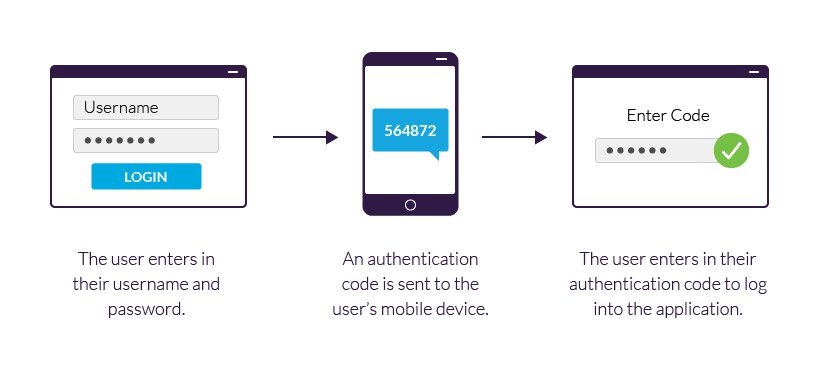
Two-factor authentication adds a second layer of security by requiring a verification code in addition to your password. Even if someone manages to steal your login details, they won’t be able to access your account without the second step.
Most major platforms, including Google, Facebook, and Apple, offer two-factor authentication options. Activating this feature takes only a few minutes but provides long-term protection against unauthorized access.
Keep Your Devices and Software Updated
Software updates are not just about new features—they often contain critical security patches. Hackers actively exploit known vulnerabilities in outdated systems, making regular updates an essential part of staying safe online.
Enable automatic updates for your operating system whenever possible. Browsers, mobile apps, and antivirus software should also stay current. Using unsupported systems, such as outdated operating systems, leaves your device exposed to known security flaws.
Consistently updating software helps close security gaps before they can be exploited.
Check Website Security Before Entering Information
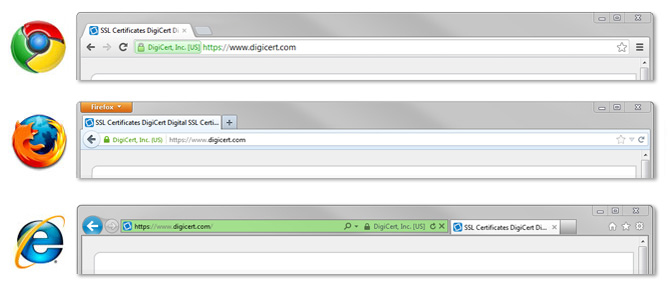
Before entering passwords, payment details, or personal information, confirm that the website is secure. Secure websites use HTTPS encryption to protect data transmitted between your browser and the server.
Look for a lock icon in the browser’s address bar and ensure the web address begins with “https://”. Websites without these indicators may not adequately protect your information, especially during online purchases or account logins.
Recognize and Avoid Phishing Scams
Phishing attacks attempt to trick users into revealing sensitive information by impersonating trusted companies or contacts. These scams often arrive as emails, messages, or fake websites that closely resemble legitimate ones.
Common warning signs include urgent language, requests for immediate action, suspicious links, and subtle spelling errors in sender addresses. Messages claiming account problems or unexpected refunds are especially common tactics.
Understanding how phishing works helps reduce the risk of accidentally sharing credentials or financial information. Awareness of these tactics is essential for protecting online accounts and personal data.
Be Careful With Email Attachments and Links
Email remains one of the primary methods for spreading malware. Attachments or links from unknown or unexpected senders should always be treated with caution, even if they appear to come from familiar names.
Scanning attachments with antivirus software, avoiding unsolicited downloads, and verifying suspicious emails through another communication channel can help prevent infections. When in doubt, it’s safer to delete the message.
Read Prompts Carefully Before Installing Anything
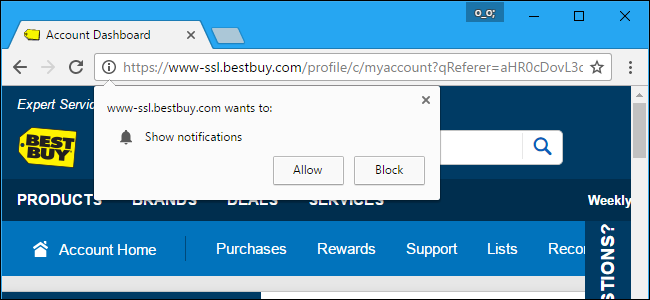
Pop-ups and installation prompts often attempt to bundle additional software alongside legitimate downloads. These extra programs can slow down your device, invade privacy, or introduce security risks.
Always read permissions, terms, and checkbox options before clicking “Install” or “Accept.” Unnecessary browser toolbars or extensions are common sources of performance and privacy issues.
If an installation feels unclear or unnecessary, closing the window is often the safest option.
Be Cautious on Shared or Public Computers
Using shared or public computers increases the risk of exposing personal data. These systems may have monitoring software, outdated security settings, or malware installed without your knowledge.
If you must log in on a shared device, avoid saving passwords and always log out completely. Using private or incognito browsing modes can reduce traces of your activity, but they do not provide full protection.
The same precautions apply when using a friend’s computer or a workplace device.
Choose a Modern, Secure Web Browser
Older browsers no longer receive security updates, making them vulnerable to modern threats. Modern browsers such as Google Chrome, Mozilla Firefox, and Microsoft Edge include built-in protections against phishing, malicious websites, and harmful downloads.
Using a supported browser ensures access to regular security updates and improved privacy features that help protect your online activity.
Keep Browser Extensions Under Control
Outdated or unnecessary browser extensions can create security risks. Some extensions request excessive permissions or stop receiving updates, making them easy targets for exploitation.
Regularly review installed extensions and remove those you no longer use. Download extensions only from trusted sources and avoid granting permissions that aren’t essential to their function.
Store Passwords Safely
Writing passwords on paper or storing them in unencrypted files increases the risk of unauthorized access. Secure password storage tools encrypt your credentials and protect them behind a single master password.
Using secure storage not only protects existing accounts but also makes it easier to maintain strong, unique passwords over time.
Protect Your Device From Malware and Viruses
Antivirus and anti-malware software play an important role in protecting your system. Built-in tools like Windows Defender provide reliable real-time protection for many users.
Additional tools such as Malwarebytes can help detect threats like spyware and adware. Scheduling regular scans, avoiding pirated software, and being cautious with downloads further reduces malware risk.
Verify Downloads With Checksums
Checksums help confirm that downloaded files haven’t been altered or tampered with. Many reputable software providers offer checksum values such as SHA-1 or MD5 to verify file integrity.
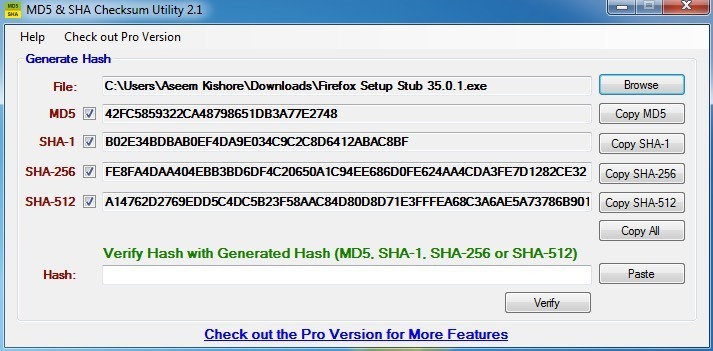
Understanding how checksums work makes it easier to confirm that software downloads are authentic and safe before installation.
Final Thoughts: Simple Habits Make a Big Difference
Online safety isn’t about fear—it’s about awareness and consistency. Small habits like updating software, using strong passwords, and staying alert to suspicious messages significantly reduce online risk.
Technology will continue to evolve, but basic security practices remain effective. By staying informed and cautious, anyone can enjoy the benefits of the internet while keeping their personal information protected.
Related Posts
 Technology
Wifi
mobile phone plans
Technology
Wifi
mobile phone plans
What Is a Mobile Hotspot and How Does It Work?
A mobile hotspot is a portable feature or device that converts a cellular data connection (like 4G LTE or 5G) into a private Wi-Fi network
 Broadband Deals
cable deal
Broadband Deals
cable deal
Xfinity Cable Package Deals That Actually Deliver Value
Discover the best Xfinity cable package deals, compare internet and TV bundles, understand pricing, and choose the right plan for your home and budget.
 Broadband Deals
What Is TDS Internet and Is It Right for Your Home?
Learn what TDS Internet is, how it works, available plans, pricing, speeds, benefits, and how it compares with other internet providers.
 Internet Bundles
Bundle Internet, TV, and Phone Without Overpaying
Learn how to bundle internet, TV, and phone services for the best value. Compare plans, avoid hidden fees, and choose the right package for your home.
 Broadband Deals
cable deal
cheap internet deals
Broadband Deals
cable deal
cheap internet deals
Chicago Neighborhood Internet Guide for Better Connectivity
Explore internet options across Chicago neighborhoods, compare providers, understand speeds, costs, and find the best broadband solution.