How to Set Up and Optimize WiFi Network for Small Business

How to set up a wi-fi network for small businesses? Before anything else, make sure you have an internet connection in your home. If you don't have yet, order an internet package from a service provider near you.
In order for you to have ease getting an internet connection, we have researched a lot of trusted internet provider based in your area. So make sure to dive into our provider page to learn more. Just enter your zip code and shop a package that suits your needs.
Also, Read: Best Internet Service Providers for Small Businesses in 2022
How to Setup a Wi-Fi Network in Easy Steps
Purchase a modem
Once the internet has been installed, you will need a modem. The modem is a device to connect to web and internet connection from the type of connection such as fiber, cable, DSL, or satellite.
To make an internet connection from your modem to your computer, simply plug in your ethernet cable to be able to communicate with your internet service provider.
Also, Read: Easiest Way to Self-Install Your Spectrum Internet Service
Router
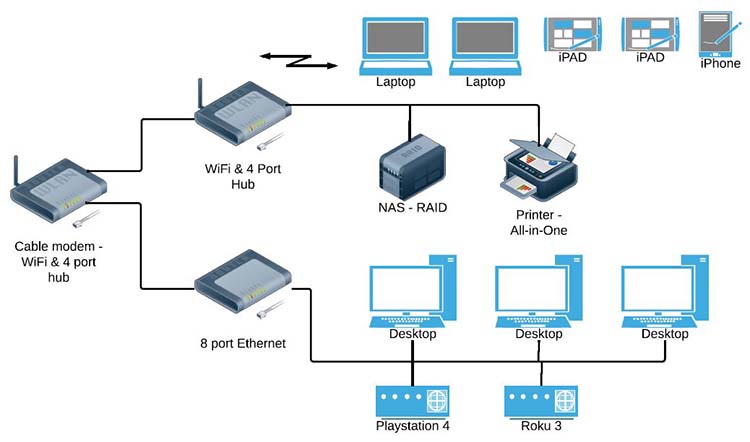
The most modem is only capable of one ethernet-ready device like a computer. In order for you to hook up multiple devices to your internet connection, you need additional equipment which is the router.
The router will broadcast the internet connection from your modem to multiple devices wirelessly called Wi-Fi. This is a very important device to utilize your internet functionality, and most importantly you will be able to share your internet connection across your family members.
Connecting your Wi-Fi
Now that you have an internet connection, modem, and router, its time to make your home Wi-Fi network ready.
1. Get the internet provider's cable or telephone cord (this depends on ISP)
2. Plug the Ethernet cable provided by the company in both the internet modem and router.
3. Now that you have connected both internet modem and route, get both device power cords and plug it into your power outlet.
4. Once everything is plug in, switch on both devices, and let them connect to each other for calibration.
Also, Read AT&T Business Internet: Things You Need To Know! Complete Guide
Setting up Wi-Fi Network
If everything is turned on, its time to set up your Wi-Fi network via web routers web interface.
1. Look at the router bottom and find for the IP address and default admins login credentials, or get the routers manual for instructions.
2. After that, open your favorite browser and enter the IP address into the URL address bar. This will open the router's web interface.
3. Most router will walk you through using the set-up wizard. Fillup all necessary information ask especially changing the Wi-Fi network and password.
After you completed all the steps above your wifi- network is ready to surf the internet, The router will now able to receive internet protocol on the internet and transmit the internet to any device connected on your network.
Related Posts
 Safety
What Not to Do And Internet Safety Tips To Protect You Online
Learn what not to do online and discover practical internet safety tips to protect your personal data, devices, and accounts from cyber threats.
 cheap internet deals
Cheap Internet Plans in Florida: Find the Right Fit Fast
Discover how to find cheap internet plans in Florida based on your lifestyle, location, and speed needs. Compare providers and choose the best plan today.
 cheap internet deals
Cheap Internet Plans vs Premium Plans
Cheap vs premium internet plans explained. Learn the key differences in speed, data limits, reliability, and pricing to choose the best plan for your home.
 Subscription
cheap internet offers
Subscription
cheap internet offers
Spectrum vs Verizon 5G Home Internet: Which Is Better?
Spectrum vs Verizon 5G Home Internet: compare speed, pricing, reliability, and availability to choose the best home internet provider for your household.
 Internet Bundles
How to Get Free or Cheap Internet in the U.S.
Learn how to get free or discounted internet in the U.S. Discover government programs, provider discounts, and practical ways to lower your monthly bill.