How To Find IP Address from Windows, Mac, Android and iOS?

How to Find IP Address? Well, asking Google for your public IP address is a straightforward approach to find it. The steps are straightforward:
Step 1: Open a web browser of your choice.
Step 2: Go to google.com
Step 3: In the search field, type "What is my IP address."
Your public IP address will appear at the top of Google's search results. Additional sites will also publish your public IP address, as well as other information, such as a rough estimate of your location.
Also, Read: How Important to Change Your IP Address
How can you find your private IP address in Windows?
The IPCONFIG command is the quickest way to discover your private IP address on Windows. Follow these steps to accomplish this:
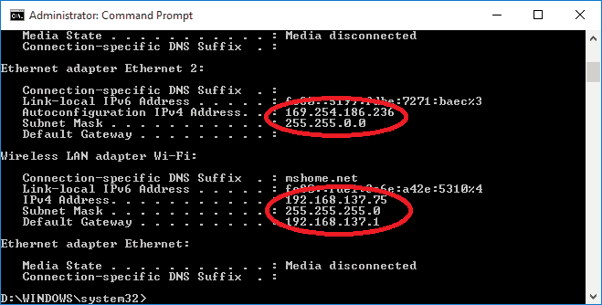
Step 1: From the Power User Menu, right-click on the Start button and select Windows Power Shell.
Step 2: In the Windows PowerShell window, type the command "IPCONFIG" and hit Enter. This will display all of the IP configuration information for Windows.
As shown above, the number you need displays next to IPv4 Address.
In macOS, how can you find your private IP address?
Step 1: Select System Preferences from the Apple icon. You can also go to the Dock and click on the System Preferences icon (if available).
Step 2: Choose a network to connect to.
Step 3: Select your network and then, at the bottom of the box, select Advanced.
Step 4: Go to the TCP/IP tab and click it.
How do you find your private IP address on Android?
Skip to the following section if you have a Samsung device. Otherwise, the instructions that follow are for vanilla Android.
Step 1: From the top, expand the Quick Settings menu and hit the "gear" symbol.
Step 2: Select Wi-Fi from the menu.
Step 3: Next to your current Wi-Fi connection, tap the "gear" symbol.
Step 4: Select Advanced from the drop-down menu.
Under IP Address, you'll find the number you're looking for.
Related Posts
 Safety
What Not to Do And Internet Safety Tips To Protect You Online
Learn what not to do online and discover practical internet safety tips to protect your personal data, devices, and accounts from cyber threats.
 cheap internet deals
Cheap Internet Plans in Florida: Find the Right Fit Fast
Discover how to find cheap internet plans in Florida based on your lifestyle, location, and speed needs. Compare providers and choose the best plan today.
 cheap internet deals
Cheap Internet Plans vs Premium Plans
Cheap vs premium internet plans explained. Learn the key differences in speed, data limits, reliability, and pricing to choose the best plan for your home.
 Subscription
cheap internet offers
Subscription
cheap internet offers
Spectrum vs Verizon 5G Home Internet: Which Is Better?
Spectrum vs Verizon 5G Home Internet: compare speed, pricing, reliability, and availability to choose the best home internet provider for your household.
 Internet Bundles
How to Get Free or Cheap Internet in the U.S.
Learn how to get free or discounted internet in the U.S. Discover government programs, provider discounts, and practical ways to lower your monthly bill.