How to do a hard refresh on your browser

By deleting the cache for that page, a hard refresh causes your browser to load the most recent version of a website. It's possible that new scripts, styles, and functionality will be included.
It is not a hard refresh to click the "Refresh" arrow in your browser address bar.
On different sorts of browsers, here's how to do a hard refresh.
Mobile Browsers
Safari on your iPhone, iPad, or iPod touch
To clear your cookies and keep your history, go to Settings > Safari > Advanced > Website Data, then tap Remove All Website Data.
Chrome (on iPhones and iPads)
-
On your iPhone or iPad, open the Chrome app.
-
At the bottom, tap More.
-
Tap
History > Clear browsing data. -
Make sure there’s a checkmark next to “Cookies, Site Data,” and “Cached Images and Files.”
-
Tap Clear browsing data.
Chrome (on Android)
-
On your Android phone or tablet, open the Chrome app.
-
At the top right, tap More.
-
Tap
History > Clear browsing data. -
At the top, choose a time range. To delete everything, select All time.
-
Next to “Cookies and site data” and “Cached images and files,” check the boxes.
-
Tap Clear data.
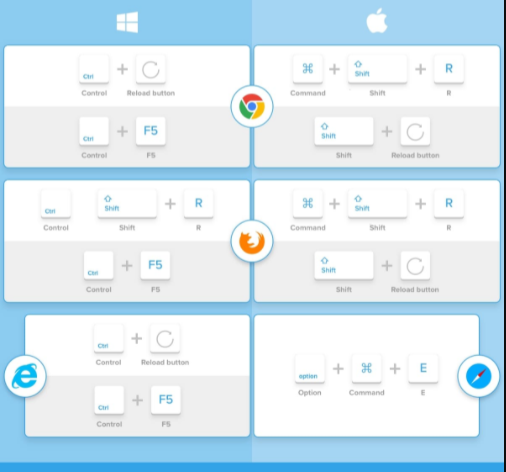
Desktop Browsers
Google Chrome
-
Windows: Press Ctrl + F5
-
Mac: hold Cmd + Shift and then press R
Firefox
-
Windows: Press Ctrl + F5
-
Mac: hold Cmd + Shift and then press R
Safari
-
Mac: On the menu go to
Safari >Empty Cache, or press Opt + Cmd + E
Internet Explorer/ Edge (Windows)
-
Windows: Press Ctrl + F5
Related Posts
 Safety
What Not to Do And Internet Safety Tips To Protect You Online
Learn what not to do online and discover practical internet safety tips to protect your personal data, devices, and accounts from cyber threats.
 cheap internet deals
Cheap Internet Plans in Florida: Find the Right Fit Fast
Discover how to find cheap internet plans in Florida based on your lifestyle, location, and speed needs. Compare providers and choose the best plan today.
 cheap internet deals
Cheap Internet Plans vs Premium Plans
Cheap vs premium internet plans explained. Learn the key differences in speed, data limits, reliability, and pricing to choose the best plan for your home.
 Subscription
cheap internet offers
Subscription
cheap internet offers
Spectrum vs Verizon 5G Home Internet: Which Is Better?
Spectrum vs Verizon 5G Home Internet: compare speed, pricing, reliability, and availability to choose the best home internet provider for your household.
 Internet Bundles
How to Get Free or Cheap Internet in the U.S.
Learn how to get free or discounted internet in the U.S. Discover government programs, provider discounts, and practical ways to lower your monthly bill.