How to Boost Satellite Internet Signal Fast and Easily

Satellite internet is a reliable solution for homes in rural or remote areas where cable and DSL are not available. However, many users experience slow speeds or inconsistent connections. The good news is that there are practical ways to boost satellite internet and enjoy faster, more stable online access. In this guide, we’ll explore everything you need to know, from understanding how satellite internet works to practical tips for improving your signal strength.
Understanding Satellite Internet
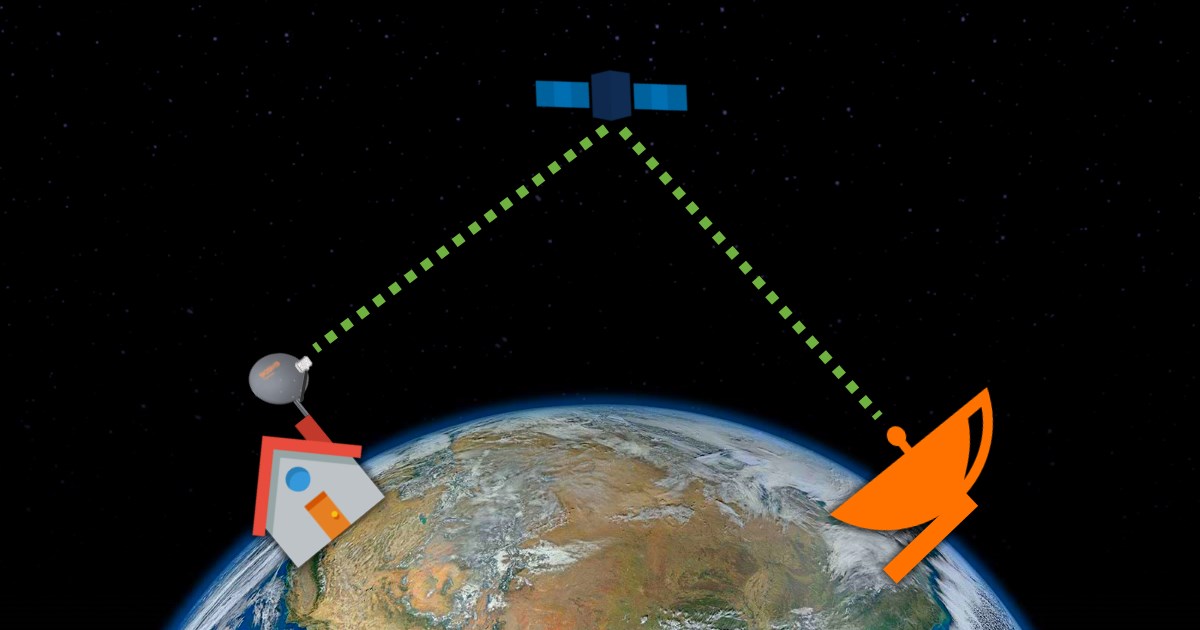
Satellite internet is a type of wireless internet connection that uses satellites orbiting the Earth to deliver internet service to your home. The system typically involves three key components:
- The satellite in space – This receives and transmits internet data from your ISP.
- The ground station at your ISP – It connects to the satellite and serves as the hub for internet traffic.
- The satellite dish at your home – This communicates with the satellite and delivers the internet signal to your modem.
To use satellite internet, you also need a modem and connecting cables to ensure proper signal transmission. Once installed, the satellite system works like this:
- When you browse the web, stream videos, or send emails, your requests are sent from your modem to your home dish.
- The dish relays the signal to the satellite in space.
- The satellite then sends the data to the ISP’s ground station, which connects to the internet.
- The response follows the same path in reverse.
This long-distance signal travel is what can sometimes cause lag, slower speeds, or interruptions. Knowing this helps you understand why small adjustments at home can significantly boost your satellite internet.
Satellite internet is especially ideal for areas where cable, fiber, or DSL options are unavailable. But even in these areas, signal strength can fluctuate depending on weather, obstacles, or equipment placement.
Practical Ways to Boost Satellite Internet
Improving your satellite internet signal doesn’t always require expensive upgrades. Often, small adjustments and simple devices can make a noticeable difference in speed and reliability.
Place the Satellite Dish Closer
Distance matters when it comes to satellite signals. If your satellite dish is installed far from your modem or inside areas with obstructions, the signal may weaken before it reaches your devices.
- Consider moving the dish closer to your home or the modem.
- Ensure the dish has a clear line of sight to the sky and is free from physical obstructions like walls or overhangs.
- Always consult your ISP before repositioning your satellite dish. They can safely adjust it on your roof or side of the house to maximize signal strength.
A small repositioning can sometimes improve your download and upload speeds significantly.
Clear Surrounding Obstacles
Trees, bushes, and other physical obstructions can block or scatter satellite signals, reducing your internet speed.
- Inspect the area around your satellite dish and remove any obstacles in the path of the signal.
- Even small branches or leaves can affect the connection, especially during windy conditions.
- If removing trees is not possible, consider trimming or repositioning the dish for better line-of-sight.
A clear, unobstructed path ensures that your satellite signal travels efficiently from space to your modem.
Install an In-Line Amplifier
If your satellite signal is still weak, an in-line amplifier can help strengthen the connection between your dish and modem.
- This device is installed along the cable connecting your satellite dish to your modem.
- It amplifies the signal, reducing the effects of distance and interference.
- Many ISPs provide in-line amplifiers or can install them for you. Alternatively, refer to your satellite manual for proper installation guidance.
An in-line amplifier is especially useful in areas where the signal naturally loses strength due to terrain or long cable runs.
Consider Switching Satellites
It may seem unusual, but many ISPs have access to multiple satellites orbiting the Earth. Switching which satellite your dish communicates with can sometimes improve signal strength and reduce congestion.
- Contact your ISP and ask if they can redirect your dish to another satellite.
- Different satellites may offer better bandwidth or lower latency, depending on traffic and your location.
This step is often overlooked but can significantly boost your satellite internet performance.
Switch Your ISP
If you’ve tried repositioning your dish, clearing obstacles, adding an amplifier, and switching satellites without improvement, it may be time to consider switching your internet service provider.
- Some ISPs offer better technology, stronger satellites, or optimized ground stations that improve overall performance.
- Research providers in your area and compare their satellite internet packages, speeds, and reliability ratings.
Switching to a more capable ISP can be a long-term solution if your current provider cannot meet your speed or stability needs.
Testing Your Satellite Internet Signal
Before making major changes, it’s important to measure your current satellite internet speed and signal quality. You can check your connection using a reliable tool:
Regular testing allows you to monitor improvements after adjustments, ensuring that any changes you make have a positive effect.
Additional Tips for Maintaining Strong Satellite Internet
Boosting your signal is just the start. Maintaining it is equally important for consistent performance.
Regularly Update Equipment
- Ensure your modem and satellite dish firmware are up-to-date.
- Outdated equipment can reduce speed and reliability.
Protect Against Weather
- Heavy rain, snow, or extreme wind can temporarily weaken satellite signals.
- Position your dish to minimize exposure or install protective covers if recommended by your ISP.
Optimize Your Home Network
- Limit the number of devices connected simultaneously, especially for high-bandwidth activities like streaming or gaming.
- Use wired connections when possible for devices that need maximum speed.
Schedule Peak Usage Smartly
- Satellite internet may experience slower speeds during peak hours.
- Plan high-bandwidth tasks, like downloads or video streaming, during off-peak times for better performance.
When to Call for Professional Help
Sometimes, despite all adjustments, your satellite signal may still underperform. In these cases, professional support is essential.
- Contact your ISP for advanced troubleshooting, dish repositioning, or equipment upgrades.
- If switching satellites or ISPs is necessary, a professional can guide you through the best options.
If you need to switch satellite ISP, call us directly:
Conclusion
Satellite internet is an invaluable option for rural or remote areas, but slow speeds or weak signals can limit its usefulness. Fortunately, simple adjustments like repositioning your dish, clearing obstacles, adding an in-line amplifier, or switching satellites can significantly improve your connection.
Regular testing, maintaining equipment, and optimizing your home network are key to keeping your satellite internet fast and reliable. If all else fails, contacting your ISP or considering a different provider can ensure you get the internet signal you need.
Related Posts
 Safety
What Not to Do And Internet Safety Tips To Protect You Online
Learn what not to do online and discover practical internet safety tips to protect your personal data, devices, and accounts from cyber threats.
 cheap internet deals
Cheap Internet Plans in Florida: Find the Right Fit Fast
Discover how to find cheap internet plans in Florida based on your lifestyle, location, and speed needs. Compare providers and choose the best plan today.
 cheap internet deals
Cheap Internet Plans vs Premium Plans
Cheap vs premium internet plans explained. Learn the key differences in speed, data limits, reliability, and pricing to choose the best plan for your home.
 Subscription
cheap internet offers
Subscription
cheap internet offers
Spectrum vs Verizon 5G Home Internet: Which Is Better?
Spectrum vs Verizon 5G Home Internet: compare speed, pricing, reliability, and availability to choose the best home internet provider for your household.
 Internet Bundles
How to Get Free or Cheap Internet in the U.S.
Learn how to get free or discounted internet in the U.S. Discover government programs, provider discounts, and practical ways to lower your monthly bill.