Wi-Fi Calling Explained: How It Works and Why It Matters

Weak cellular signals can be frustrating, especially when you are at home, inside large buildings, or traveling in areas with poor coverage. Dropped calls, missed messages, and unreliable service are common problems many smartphone users deal with every day.
That is where Wi-Fi calling becomes useful.
Wi-Fi calling allows your smartphone to make and receive calls using a Wi-Fi connection instead of relying entirely on a mobile network tower. It is one of the simplest ways to improve call quality indoors while helping you stay connected in places where traditional cellular signals struggle.
In this guide, you will learn what Wi-Fi calling is, how it works, how to activate it on your device, its advantages and limitations, and whether it can help improve your everyday mobile experience.
What Is Wi-Fi Calling?
Wi-Fi calling is a smartphone feature that lets users place phone calls and send text messages through a wireless internet connection instead of a cellular network.
Rather than depending entirely on nearby cell towers, your phone routes voice calls through a connected Wi-Fi network. This helps improve call quality in areas with weak mobile reception, including homes, offices, apartments, hotels, and underground locations.
Modern smartphones now include built-in Wi-Fi calling support, making the feature easy to use without installing third-party apps.
Once enabled, Wi-Fi calling works almost exactly like a regular phone call. You simply dial a number using your phone’s default calling app, and the call automatically uses Wi-Fi whenever cellular coverage is weak or unavailable.
How Does Wi-Fi Calling Work?
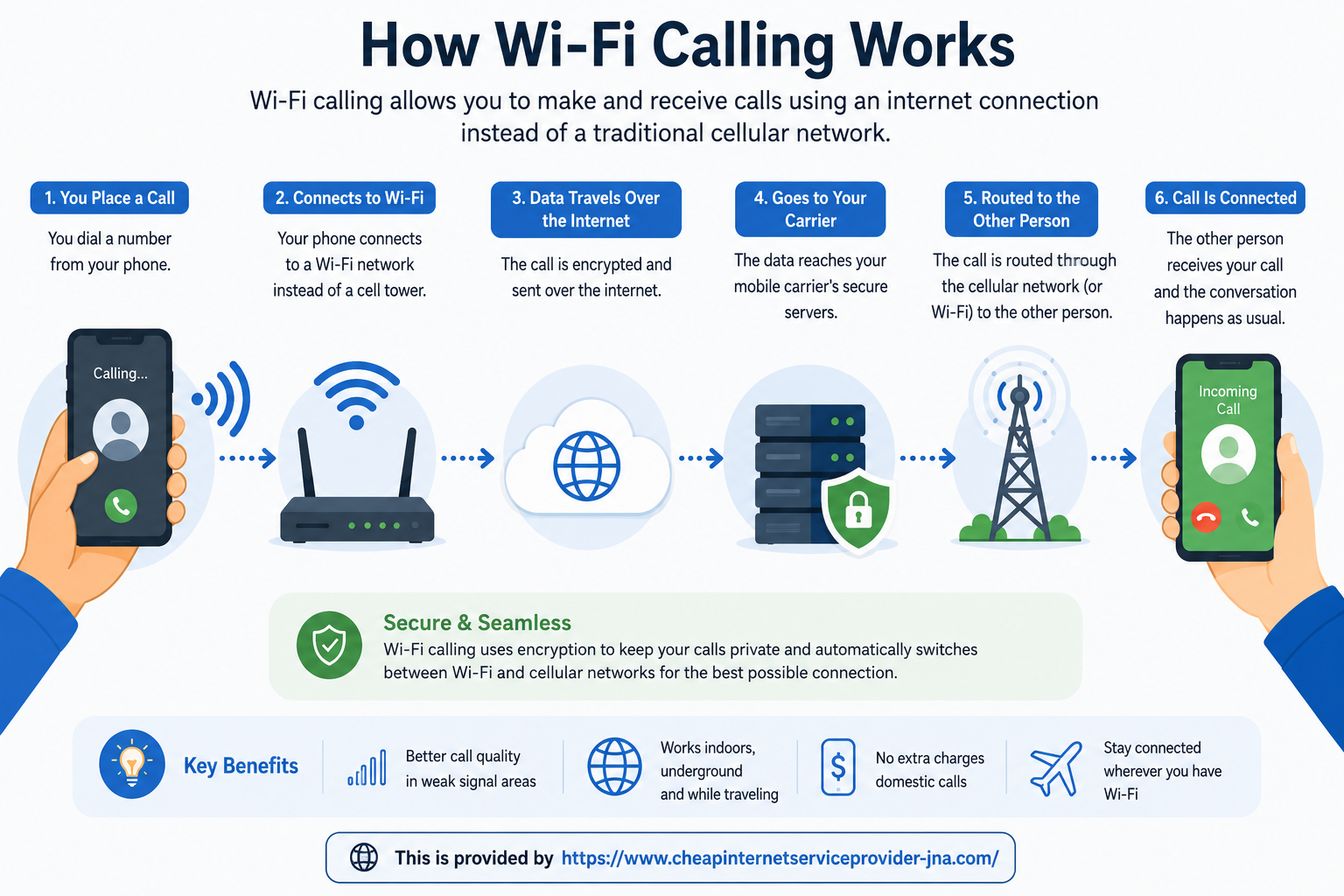
Wi-Fi calling uses Voice over Internet Protocol (VoIP) technology to transmit voice data through the internet.
Instead of sending your call through a traditional cellular tower, your phone securely routes the audio data through your connected Wi-Fi network and your carrier’s servers.
This process happens automatically in the background. Most users will not notice any difference in how they place or receive calls.
The technology behind Wi-Fi calling often relies on advanced network systems such as SIP and IMS frameworks, which help carriers maintain call quality and secure connections across wireless networks.
Why Wi-Fi Calling Is Important
Many people experience weak cellular signals indoors because walls, building materials, and physical obstructions interfere with mobile reception.
Wi-Fi calling solves this issue by using your internet connection instead.
This can be especially useful in:
- Homes with poor cell coverage
- Apartment buildings
- Office spaces
- Restaurants and shopping centers
- Rural locations
- Basements and underground parking areas
- Hotels while traveling
For users dealing with weak wireless coverage at home, improving network performance with a better home WiFi signal setup can also improve Wi-Fi calling reliability.
Benefits of Using Wi-Fi Calling
Better Indoor Call Quality
One of the biggest advantages of Wi-Fi calling is clearer calls indoors.
If your home or office has weak cellular coverage but strong internet service, Wi-Fi calling can significantly reduce dropped calls and poor audio quality.
Fewer Dropped Calls
Calls placed through a stable Wi-Fi connection are often more reliable in low-signal environments.
This helps prevent interruptions during important conversations or business calls.
No Extra App Required
Unlike many internet calling services, Wi-Fi calling is built directly into most smartphones.
You do not need to download separate applications or create additional accounts.
Easier International Communication
Wi-Fi calling can help travelers avoid expensive roaming fees when calling back to the United States from abroad.
Some carriers also allow free or reduced-cost calls to certain countries through Wi-Fi networks.
For people looking for affordable ways of keeping in touch with family overseas, Wi-Fi calling can be a practical option.
Seamless User Experience
Once enabled, Wi-Fi calling works automatically whenever your phone detects a stronger Wi-Fi connection than cellular coverage.
There is no need to manually switch between networks.
Does Wi-Fi Calling Cost Extra?
In most cases, Wi-Fi calling does not cost anything additional.
Carriers typically treat Wi-Fi calls the same as standard domestic calls. If your mobile plan includes unlimited calling, Wi-Fi calls are usually included as well.
However, international calls may still incur charges depending on your carrier and calling destination.
Before using Wi-Fi calling internationally, it is important to verify your provider’s policies regarding:
- International calling rates
- Roaming charges
- Overseas Wi-Fi usage
- Supported countries
How to Enable Wi-Fi Calling on iPhone
Enabling Wi-Fi calling on an iPhone only takes a few steps.
Step-by-Step Instructions for iPhone
- Open the Settings app
- Tap Phone
- Select Wi-Fi Calling
- Toggle Wi-Fi Calling on This iPhone to ON
- Follow any carrier verification prompts if required
Once activated, your phone may display “Wi-Fi” beside your carrier name in the status bar whenever Wi-Fi calling is active.
How to Enable Wi-Fi Calling on Android
Android devices may vary slightly depending on the manufacturer and operating system version.
Step-by-Step Instructions for Android
- Open Settings
- Tap Network & Internet or Connections
- Select Mobile Network
- Tap Wi-Fi Calling
- Turn the feature ON
Some Android phones also allow users to search for “Wi-Fi Calling” directly within the Settings search bar.
After activation, your phone will automatically use Wi-Fi calling whenever appropriate.
Which Smartphones Support Wi-Fi Calling?
Most modern smartphones support Wi-Fi calling, including:
- Apple iPhones
- Samsung Galaxy devices
- Google Pixel phones
- Motorola smartphones
- OnePlus devices
However, compatibility also depends on your mobile carrier.
Some older devices may not support the feature, and certain carriers restrict Wi-Fi calling to approved smartphones.
Before enabling it, check your carrier’s compatibility list.
Wi-Fi Calling vs Cellular Calling
Although both services allow users to place calls, they function differently.
| Feature | Wi-Fi Calling | Cellular Calling |
|---|---|---|
| Uses Internet Connection | Yes | No |
| Requires Cell Tower | No | Yes |
| Indoor Signal Performance | Usually Better | Can Be Weak |
| Call Reliability | Depends on Wi-Fi | Depends on Cellular Signal |
| Roaming Support | Often Better Abroad | May Be Expensive |
| Setup Process | Requires Activation | Automatic |
Wi-Fi calling is especially beneficial when cellular coverage is poor but internet connectivity remains strong.
Common Wi-Fi Calling Problems
Although Wi-Fi calling is convenient, it is not perfect.
Weak Internet Connection
Poor Wi-Fi speeds or unstable internet connections can negatively affect call quality.
This may result in:
- Audio delays
- Echoing
- Robotic voice distortion
- Call drops
Public Wi-Fi Limitations
Public hotspots may not always provide enough bandwidth for stable calls.
Busy networks in airports, hotels, or coffee shops can impact performance.
Carrier Restrictions
Not all carriers support Wi-Fi calling equally.
Some providers limit features based on:
- Device model
- Mobile plan
- Country
- Software version
Emergency Calling Concerns
Emergency services may have difficulty identifying your exact location during Wi-Fi calls.
Many carriers require users to register an emergency address for this reason.
Is Wi-Fi Calling Safe?
Yes, Wi-Fi calling is generally secure.
Carriers use encrypted connections to protect calls transmitted over Wi-Fi networks.
However, users should still exercise caution when using unsecured public Wi-Fi hotspots.
Using trusted networks or a secure VPN connection can provide additional privacy protection.
When Should You Use Wi-Fi Calling?
Wi-Fi calling is especially useful if you regularly experience poor mobile reception.
You may benefit from enabling it if you:
- Have weak indoor cellular coverage
- Work in office buildings with poor signal penetration
- Live in rural areas
- Travel internationally
- Frequently experience dropped calls
- Depend heavily on voice communication
For many users, enabling Wi-Fi calling improves day-to-day connectivity without requiring additional hardware.
Can Wi-Fi Calling Replace Cellular Service?
Not entirely.
Wi-Fi calling is designed to supplement cellular service rather than replace it completely.
You still need:
- A compatible smartphone
- An active mobile carrier plan
- Internet access
If your Wi-Fi network goes offline, your phone will typically switch back to cellular service automatically.
Tips for Improving Wi-Fi Calling Quality
Use a Strong Wi-Fi Signal
Stay close to your router whenever possible for better stability.
Upgrade Your Internet Speed
Slower internet connections may struggle to maintain high-quality voice calls.
Reduce Network Congestion
Too many connected devices can affect call performance.
Restart Your Router
Occasional router restarts may improve overall connection quality.
Update Your Phone Software
Keeping your device updated ensures compatibility with the latest carrier features and performance improvements.
Final Thoughts
Wi-Fi calling has become an essential smartphone feature for people dealing with poor cellular reception, especially indoors.
By routing calls through your internet connection, it provides a convenient way to improve call quality, reduce dropped calls, and stay connected in more places.
The setup process is simple, most modern smartphones support it, and many carriers include the feature at no additional cost.
Whether you work from home, travel frequently, or simply want more reliable communication, enabling Wi-Fi calling can make a noticeable difference in your daily mobile experience.
Frequently Asked Questions
Does Wi-Fi calling use mobile data?
No. Wi-Fi calling uses your connected wireless internet network instead of mobile data.
Can I receive text messages through Wi-Fi calling?
Yes. Most carriers support both voice calls and SMS messaging through Wi-Fi calling.
Do both people need Wi-Fi calling enabled?
No. Only the person placing the call needs Wi-Fi calling activated.
Is Wi-Fi calling available internationally?
Yes, but availability depends on your carrier and location.
Does Wi-Fi calling drain battery life?
Wi-Fi calling may slightly increase battery usage, but the impact is usually minimal.
Can Wi-Fi calling work without a SIM card?
In most cases, no. You still need an active carrier account and SIM card for standard Wi-Fi calling features.
Related Posts
 cheap internet deals
Best 300 Mbps Internet Deals: Top Plans Worth Paying For
Compare the best 300 Mbps internet deals from Xfinity, Spectrum, AT&T Fiber, and T-Mobile in 2026. Real pricing, hidden fees, and the right plan for you.
 Broadband Deals
cheap internet plans
Subscription
Broadband Deals
cheap internet plans
Subscription
Affordable High-Speed Internet for Seniors and Families
Find affordable high-speed internet for seniors and families. Compare speeds, costs, discounts, and low-cost plans to choose reliable service.
 Technology
Internet Speed Test: Benefits, Pros, and Cons Explained
Learn how internet speed tests work, what they measure, and their key benefits, pros, and cons. Get accurate results and use them to hold your ISP accountable.
 cheap internet deals
Wifi
cheap internet deals
Wifi
How to Get Cheap Temporary Internet for 3–6 Months
Learn how to get affordable temporary internet for 3–6 months without cancellation fees, including no-contract, 5G, prepaid, and flexible internet options.
 Broadband Deals
How to Search Internet Providers by Zip Code and Compare Plans
Search internet by zip code to find local providers, plans, and speeds available in your area. Compare options and get the best deal near you.