Switch to Google DNS or OpenDNS to Speed Up Web Browsing Experience
If your internet service provider’s DNS servers are not the fastest around, it can probably slow down your internet. Web browser requires to look up every website’s IP you are browsing. To improve your browsing experience, here’s how to switch to either Google DNS or OpenDNS for faster loading speed.
Also, Read: 14 Free DNS Servers to check out in 2021
What is "Domain Name System"?
The Domain Name System delegates the responsibility of assigning domain names and mapping those names to Internet resources by designating authoritative name servers for each domain. Network administrators may delegate authority over sub-domains of their allocated name space to other name servers. This mechanism provides a distributed and fault-tolerant service and was designed to avoid a single large central database. – Source Wikipedia
Note: This trick works for Windows 7,8 and 10
How to Switch to Google DNS or OpenDNS?
1. “Open the Network and Sharing Center” by right-clicking the network status icon in the system tray.
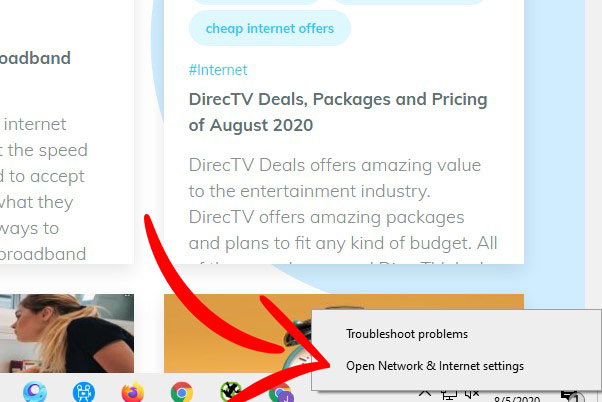
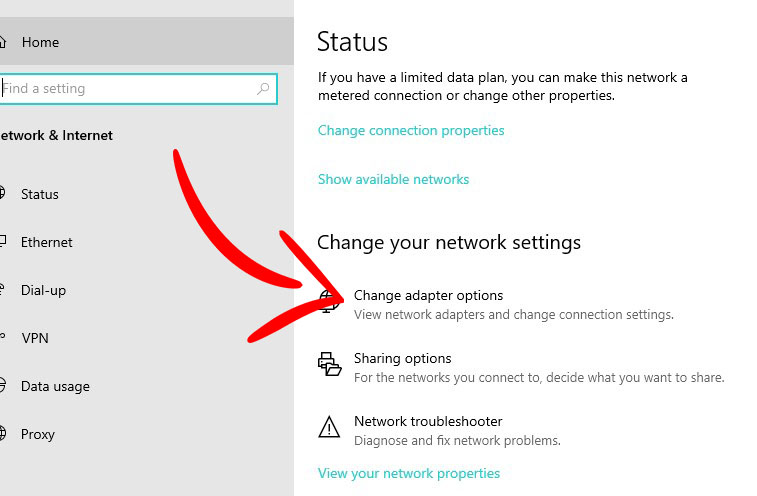
2. Click the “Change adapter settings” in the “Network and Sharing Center” window.
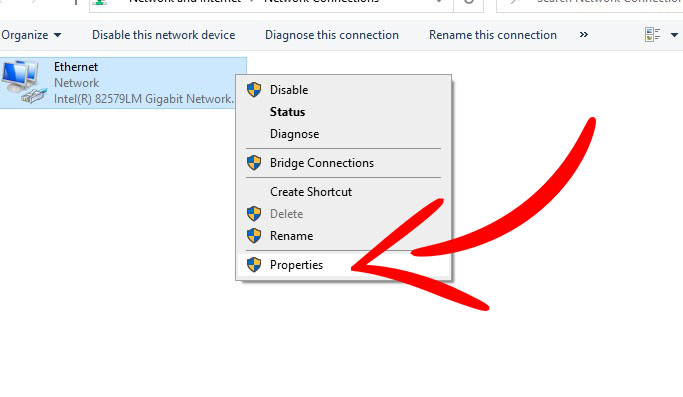
3. Right-click the connection type you want to switch to then right-click on “Properties“, for example, Ethernet or your Wifi under “Network Connections” window.
4. Select “Internet Protocol Version 4 (TCP / IPv4)” under the “Properties” window then click Properties.
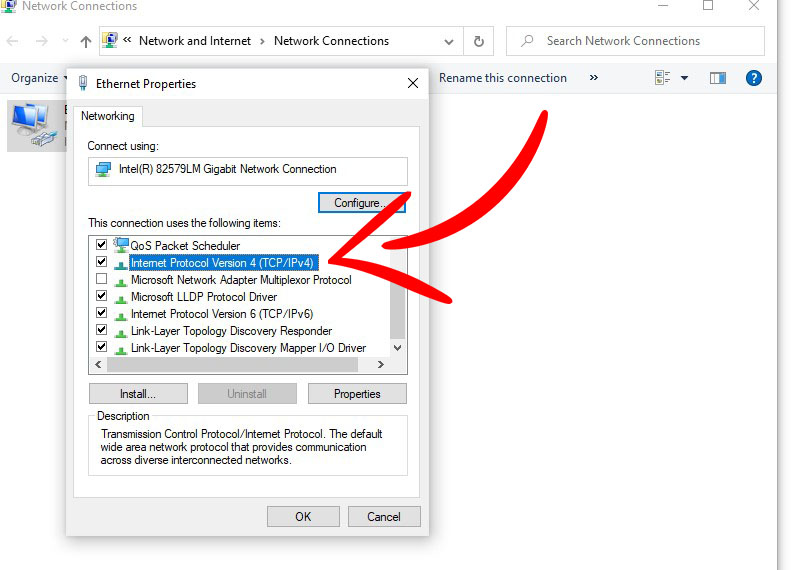
5. At this point, the screen will show you the DNS setting. At the bottom half of the window, thick “Use the following DNS server addresses:” and type the “Preferred DNS server” and “Alternate DNS server” listed below.
OpenDNS
Preferred: 208.67.222.222
Alternate: 208.67.220.220
Google DNS
Preferred: 8.8.8.8
Alternate: 8.8.4.4
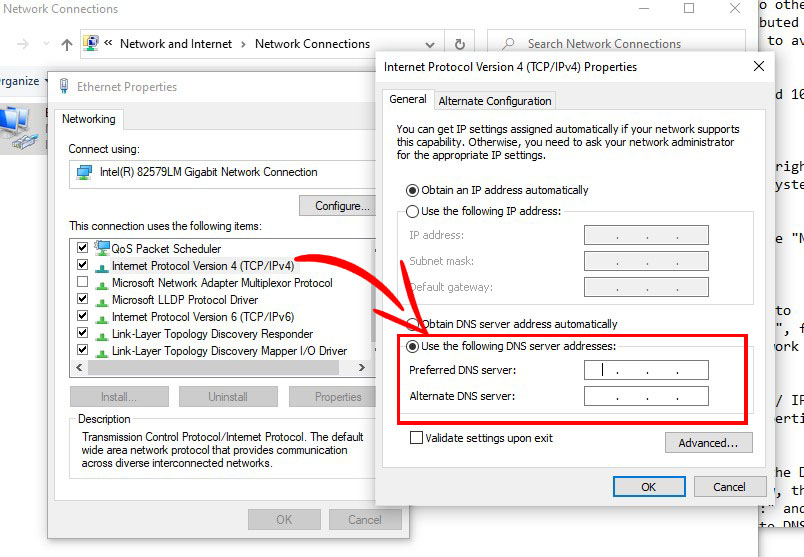
You’re done! From this point, you will experience a more reliable DNS lookup and you should experience faster internet speed.
Related Posts
 Internet Bundles
Stop Overpaying: Get More From Your Internet Plan
Learn how to save money on your internet bill by optimizing your plan, upgrading smartly, and choosing the right speed and equipment for your home.
 Internet Bundles
Broadband Deals
Technology
Wifi
Internet Bundles
Broadband Deals
Technology
Wifi
Ethernet vs Wi-Fi: Which Internet Setup Is Better?
Compare Ethernet vs Wi-Fi to find the best internet setup for speed, stability, and convenience. Learn which connection suits your needs.
 Internet Bundles
Safety
Internet Bundles
Safety
Hardware Firewalls Explained for Home Network Security
Learn how hardware firewalls protect your home network, block threats, and improve security with advanced features and better control.
 cable deal
Why Keeping Cable TV Still Makes Sense Today
Discover why cable TV still matters with live sports, reliable access, and on-demand content. See if keeping your cable subscription is worth it.
 Technology
Wifi
Broadband Deals
Technology
Wifi
Broadband Deals
How to Change Your Public IP and Router Address
Learn how to change your public IP and router address easily. Improve privacy, fix network issues, and optimize your internet setup step by step.