How To Find IP Address from Windows, Mac, Android and iOS?

How to Find IP Address? Well, asking Google for your public IP address is a straightforward approach to find it. The steps are straightforward:
Step 1: Open a web browser of your choice.
Step 2: Go to google.com
Step 3: In the search field, type "What is my IP address."
Your public IP address will appear at the top of Google's search results. Additional sites will also publish your public IP address, as well as other information, such as a rough estimate of your location.
Also, Read: How Important to Change Your IP Address
How can you find your private IP address in Windows?
The IPCONFIG command is the quickest way to discover your private IP address on Windows. Follow these steps to accomplish this:
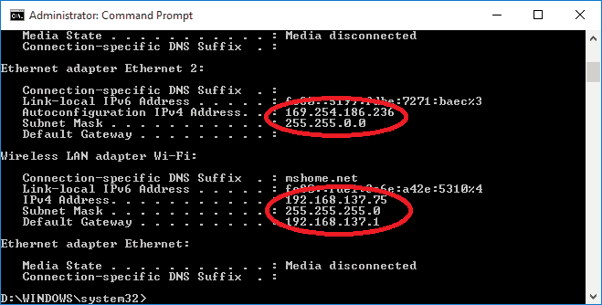
Step 1: From the Power User Menu, right-click on the Start button and select Windows Power Shell.
Step 2: In the Windows PowerShell window, type the command "IPCONFIG" and hit Enter. This will display all of the IP configuration information for Windows.
As shown above, the number you need displays next to IPv4 Address.
In macOS, how can you find your private IP address?
Step 1: Select System Preferences from the Apple icon. You can also go to the Dock and click on the System Preferences icon (if available).
Step 2: Choose a network to connect to.
Step 3: Select your network and then, at the bottom of the box, select Advanced.
Step 4: Go to the TCP/IP tab and click it.
How do you find your private IP address on Android?
Skip to the following section if you have a Samsung device. Otherwise, the instructions that follow are for vanilla Android.
Step 1: From the top, expand the Quick Settings menu and hit the "gear" symbol.
Step 2: Select Wi-Fi from the menu.
Step 3: Next to your current Wi-Fi connection, tap the "gear" symbol.
Step 4: Select Advanced from the drop-down menu.
Under IP Address, you'll find the number you're looking for.
Related Posts
 cheap internet deals
Technology
cable deal
cheap internet deals
Technology
cable deal
How Much Does Internet Cost for a Small Business?
Learn how much internet costs for a small business, what affects pricing, and how to compare speeds, plans, and providers to find the right value.
 cheap internet deals
Best 300 Mbps Internet Deals: Top Plans Worth Paying For
Compare the best 300 Mbps internet deals from Xfinity, Spectrum, AT&T Fiber, and T-Mobile in 2026. Real pricing, hidden fees, and the right plan for you.
 Broadband Deals
cheap internet plans
Subscription
Broadband Deals
cheap internet plans
Subscription
Affordable High-Speed Internet for Seniors and Families
Find affordable high-speed internet for seniors and families. Compare speeds, costs, discounts, and low-cost plans to choose reliable service.
 Technology
Internet Speed Test: Benefits, Pros, and Cons Explained
Learn how internet speed tests work, what they measure, and their key benefits, pros, and cons. Get accurate results and use them to hold your ISP accountable.
 cheap internet deals
Wifi
cheap internet deals
Wifi
How to Get Cheap Temporary Internet for 3–6 Months
Learn how to get affordable temporary internet for 3–6 months without cancellation fees, including no-contract, 5G, prepaid, and flexible internet options.