3 Command Prompt Tricks to Boost your Internet Speed Connection

We all experienced slow internet speed, it's a never-ending issue. I might be an issue with ISP or network configuration itself.
Using a Command Prompt can be resolved many common issues such as DNS, IP Address, or DNS. Here are some command prompt tips you can try to fix slow internet issues.
Accessing Command Prompt
Open your Windows Search Bar and type cmd and right-click the Command Prompt option and select "Run as administrator". There are different ways to access the command prompt based on your Windows version. However, type in the Windows search bar is the easiest way.
Once you opened the Command Prompt window
1. Resetting Winsock
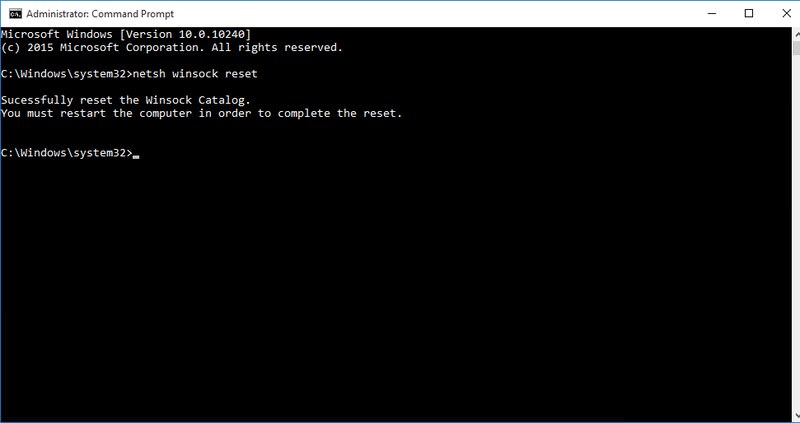
Winsock also known as Windows Network Sockets are used to exchanged information to manage redirect traffic to the right path. However, any corrupted socket may result to slow internet connection.
To reset your Windows Network Socket back to default, type netsh winsock reset in the Command Prompt and press Enter. After execution, restart your computer to apply changes.
2. Renewing IP Address
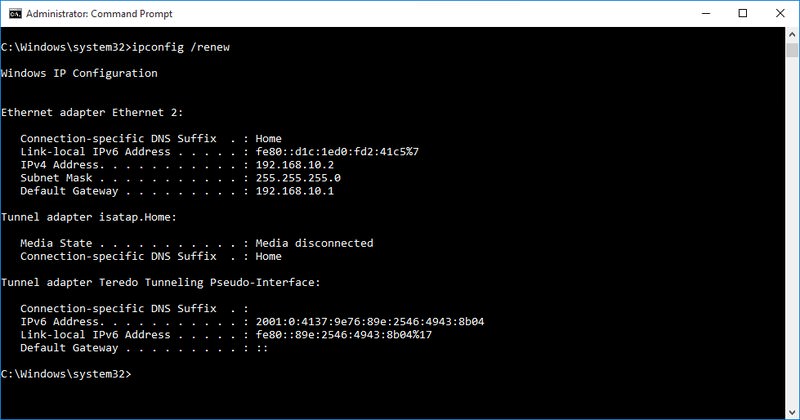
IP conflict or problem at the DHDP server may affect your current IP Address. This will cause a lot of issues including slow internet connection.
To do so, open your Command Prompt and type ipconfig /release and press Enter. This will show you a large column of text.
Next type ipconfig /renew and press Enter for the second time. It will reset your IP Address and solve any related issues including slow internet speed.
3. Flush DNS Resolver Cache
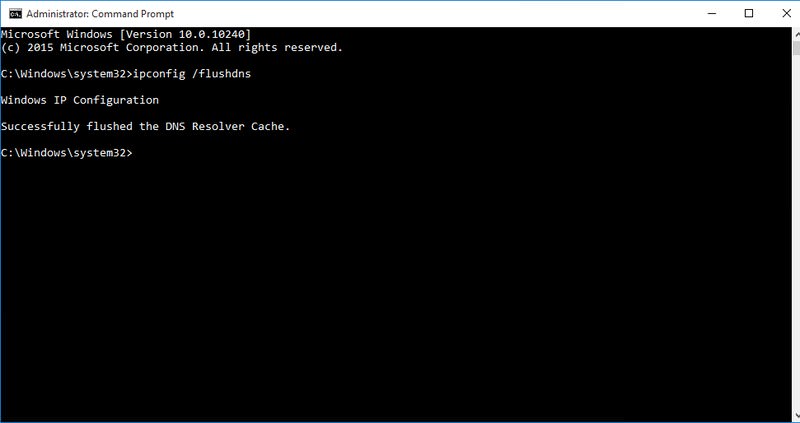
Your computer stores a list of websites IP addresses and hostnames that you browsed and save it to DNS resolver cache. This will save you time with the website you previously visited.
But, Any corruption in the DNS resolver cache will result in no access to website or slow internet connection.
To resolve this, type ipconfig /flushdns on the Command Prompt and press Enter. A text will show saying " Successfully flushed DNS Resolver Cache"
There are many ways to speed up your computer. By doing this command line trick will help you speed up your internet connection.
Related Posts
 cheap internet deals
cheap internet plans
cheap internet deals
cheap internet plans
Why Utah and the Mountain West Attract Remote Workers
Discover why Utah and the Mountain West are attracting remote workers with affordable living, reliable internet, lower utility costs, and growth.
 Technology
Why Your Internet Keeps Disconnecting and How to Fix It
Learn why your internet keeps disconnecting and discover proven fixes for router issues, Wi-Fi interference, faulty cables, and network instability.
 Broadband Deals
cheap internet deals
Subscription
Broadband Deals
cheap internet deals
Subscription
Affordable Internet and TV Bundles for the 2026 World Cup
Compare affordable internet and TV bundles for sports fans and enjoy reliable coverage of the 2026 World Cup without overspending.
 Internet Bundles
How to Detect ISP Throttling and Improve Your Internet Speed
Learn how to detect ISP throttling, identify common warning signs, test your connection, and improve internet speed for streaming, gaming, and work.
 cheap internet deals
cheap internet plans
cheap internet offers
cheap internet deals
cheap internet plans
cheap internet offers
Which ISP Offers the Best Long-Term Price Stability?
Compare ISPs with the most stable long-term pricing. Learn how to avoid bill increases, evaluate plans, and choose affordable internet service.