WiFi Extenders Explained: A Simple Way to Fix Dead Zones at Home
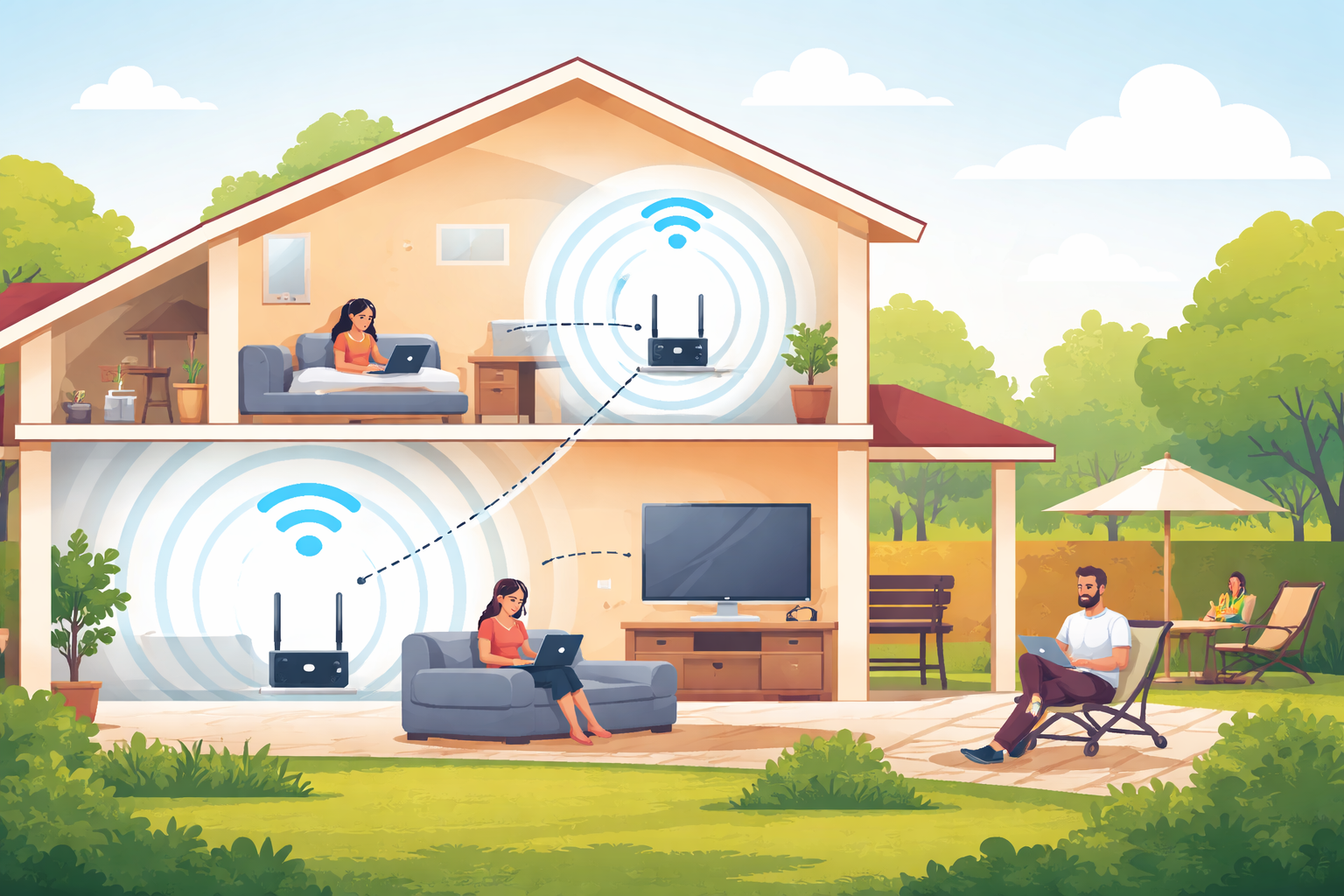
A WiFi extender is a practical solution for homes where wireless coverage falls short. Instead of replacing your router or upgrading your entire setup, an extender works as a bridge—capturing the existing WiFi signal and rebroadcasting it to areas where coverage is weak or completely unavailable. The result is stronger, more reliable connectivity throughout your home WiFi network.
If you’ve ever struggled with buffering videos upstairs, slow loading times during peak hours, or losing signal the moment you step outside, a WiFi extender can make a noticeable difference. Understanding how and where it works best is key to getting the most out of it.
This guide breaks down when a WiFi extender makes sense, where to place it, and how it improves everyday internet performance without overcomplicating your setup.
What a WiFi Extender Actually Does
A WiFi extender connects wirelessly to your router and repeats that signal to extend coverage into hard-to-reach areas. Unlike a router, it doesn’t create a new internet connection—it strengthens and redistributes the one you already have.
Think of it as a relay point. When your router struggles to push signal through walls, floors, or long distances, the extender picks up that signal at a stronger point and carries it forward. This improves WiFi coverage in rooms that would otherwise suffer from spotty or unreliable connections.
WiFi extenders are especially useful in homes where physical layout—not internet speed—is the main issue. Thick walls, multiple floors, long hallways, and closed-off rooms often block wireless signals more than people realize.
Why WiFi Coverage Breaks Down in Real Homes
Before adding an extender, it helps to understand why WiFi weak spots happen in the first place. Most coverage problems come down to three factors:
- Distance from the router
- Physical obstacles like walls and floors
- The number of connected devices
Routers are strongest near their placement point. As the signal travels, it loses strength—especially when it has to pass through concrete, brick, or multiple walls. Add several users streaming, gaming, or working remotely at the same time, and performance drops even faster.
A WiFi extender addresses these challenges by redistributing the signal more evenly across your space.
Related: Modem vs. Router: What You Need With Cheap Internet Plans
WiFi Extenders for Large Homes and Multi-Story Houses
Coverage Challenges in Bigger Spaces
Large houses often have routers placed where internet access first enters the home—usually on the ground floor or near a living area. While this location works well for nearby rooms, it creates problems for bedrooms, offices, and entertainment areas upstairs.
Vertical distance matters just as much as horizontal space. Floors, wiring, and structural materials weaken signals as effectively as thick walls.
Smart Placement Makes the Difference
Instead of placing an extender randomly, think vertically. Installing a WiFi extender in a room directly above the router often produces better results than placing it far down a hallway.
For example, if your router sits in the family room and a bedroom is located directly above it, placing the extender in that upstairs room allows it to capture a strong signal before rebroadcasting it across the second floor. This placement helps maintain consistent WiFi speed without overloading the network.
Correct placement is one of the biggest factors in extender performance, and it often determines whether the device feels like a real upgrade or a wasted investment.
When Your WiFi Doesn’t Reach Outside Your House
Staying Connected Beyond the Walls
Spending time outside while staying connected has become part of daily life. Whether you’re answering emails on the patio or streaming music in the backyard, outdoor WiFi coverage matters more than ever.
If your internet plan supports consistent speeds and isn’t limited by strict data caps, extending WiFi outdoors is often a matter of signal reach—not service quality.
Extending WiFi to Patios, Decks, and Backyards
Routers perform best when placed in open areas with minimal obstructions. The same principle applies to extenders. To push WiFi outside, position the extender near a door or window that leads to your outdoor space.
Avoid placing it deep inside the house, where walls and furniture reduce its effectiveness. A properly positioned extender can provide stable connectivity for nearby outdoor areas without needing specialized outdoor hardware.
These small placement adjustments often deliver better results than upgrading equipment unnecessarily.
Multiple Users Slowing Down Your Internet?
The Reality of Shared Networks
Homes today support more connected devices than ever. Phones, laptops, tablets, smart TVs, security systems, and gaming consoles all compete for bandwidth. When everyone gets home at the same time, performance often takes a hit.
Slow loading times, dropped connections, and lag are common signs that your WiFi network is struggling under demand.
How Extenders Help with Device Distribution
A WiFi extender doesn’t increase your internet speed, but it does help distribute the signal more evenly. By reducing the distance devices must connect wirelessly, extenders improve stability and reduce congestion in heavily used areas.
Using a dual-band WiFi extender is critical here. Older single-band extenders can actually reduce performance by splitting limited bandwidth across devices. Dual-band models handle traffic more efficiently, maintaining stronger speeds even when multiple users are active.
Choosing modern extender technology ensures smoother performance during peak usage hours.
Common Mistakes People Make with WiFi Extenders
Even a good extender won’t work well if it’s set up incorrectly. Some common mistakes include:
- Placing the extender too far from the router
- Installing it behind furniture or inside cabinets
- Using outdated single-band extenders
- Expecting it to fix slow internet plans
Extenders work best when placed within a strong signal zone. If the extender can’t receive a solid signal from the router, it can’t rebroadcast one effectively.
Understanding these limitations helps set realistic expectations and improves results.
When a WiFi Extender Is the Right Solution
A WiFi extender is ideal when:
- Certain rooms consistently have weak WiFi
- Upper floors struggle with connectivity
- Outdoor areas need limited coverage
- Multiple users overload specific areas of the house
It’s a cost-effective solution that avoids replacing your router or upgrading your entire network. When paired with smart placement and modern hardware, extenders significantly improve daily internet use.
For households relying heavily on video calls and online collaboration, securing stable connections also matters. Network safety becomes especially important when devices are spread across multiple access points, which is why maintaining secure setups—like those discussed in Simple Ways To Secure your Video Conferencing Apps—plays a role in overall performance and reliability.
Still Dealing With Internet Problems?
If WiFi extenders don’t fully resolve your issues, the problem may lie with the internet service itself. Coverage tools can only amplify what’s already available. When speeds remain inconsistent across your home, comparing providers and plans becomes an important next step.
Many households find better long-term performance by switching to services designed for higher device loads and modern usage patterns, especially as streaming and remote work demands increase.
Still, Having Problems With Your Internet Connection?

Final Thoughts on WiFi Extenders
WiFi extenders solve one of the most common home internet problems: uneven coverage. Whether you’re dealing with dead zones upstairs, unreliable backyard access, or congestion from multiple users, the right extender—placed correctly—can transform your network experience.
Rather than fighting weak signals room by room, extenders offer a simple, scalable way to improve WiFi coverage without overhauling your entire setup. When used thoughtfully, they deliver consistent connectivity where you actually need it most.
Related Posts
 Broadband Deals
cheap internet plans
Subscription
Broadband Deals
cheap internet plans
Subscription
Affordable High-Speed Internet for Seniors and Families
Find affordable high-speed internet for seniors and families. Compare speeds, costs, discounts, and low-cost plans to choose reliable service.
 Technology
Internet Speed Test: Benefits, Pros, and Cons Explained
Learn how internet speed tests work, what they measure, and their key benefits, pros, and cons. Get accurate results and use them to hold your ISP accountable.
 cheap internet deals
Wifi
cheap internet deals
Wifi
How to Get Cheap Temporary Internet for 3–6 Months
Learn how to get affordable temporary internet for 3–6 months without cancellation fees, including no-contract, 5G, prepaid, and flexible internet options.
 Broadband Deals
How to Search Internet Providers by Zip Code and Compare Plans
Search internet by zip code to find local providers, plans, and speeds available in your area. Compare options and get the best deal near you.
 Broadband Deals
cheap internet deals
Broadband Deals
cheap internet deals
How to Lower Your Home Internet Bill After ACP Ends
Learn practical ways to lower your home internet costs after ACP ended, including comparing plans, cutting fees, negotiating rates, and choosing the right speed