How to do a hard refresh on your browser

By deleting the cache for that page, a hard refresh causes your browser to load the most recent version of a website. It's possible that new scripts, styles, and functionality will be included.
It is not a hard refresh to click the "Refresh" arrow in your browser address bar.
On different sorts of browsers, here's how to do a hard refresh.
Mobile Browsers
Safari on your iPhone, iPad, or iPod touch
To clear your cookies and keep your history, go to Settings > Safari > Advanced > Website Data, then tap Remove All Website Data.
Chrome (on iPhones and iPads)
-
On your iPhone or iPad, open the Chrome app.
-
At the bottom, tap More.
-
Tap
History > Clear browsing data. -
Make sure there’s a checkmark next to “Cookies, Site Data,” and “Cached Images and Files.”
-
Tap Clear browsing data.
Chrome (on Android)
-
On your Android phone or tablet, open the Chrome app.
-
At the top right, tap More.
-
Tap
History > Clear browsing data. -
At the top, choose a time range. To delete everything, select All time.
-
Next to “Cookies and site data” and “Cached images and files,” check the boxes.
-
Tap Clear data.
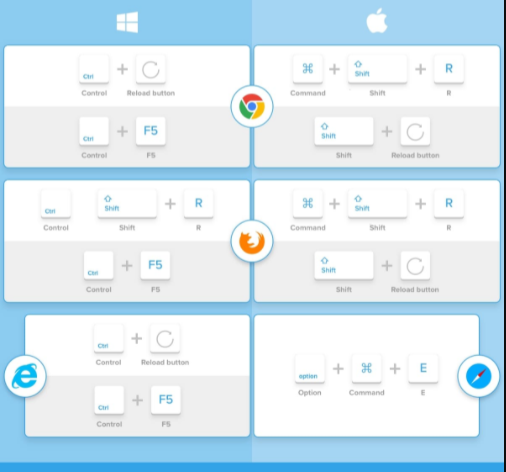
Desktop Browsers
Google Chrome
-
Windows: Press Ctrl + F5
-
Mac: hold Cmd + Shift and then press R
Firefox
-
Windows: Press Ctrl + F5
-
Mac: hold Cmd + Shift and then press R
Safari
-
Mac: On the menu go to
Safari >Empty Cache, or press Opt + Cmd + E
Internet Explorer/ Edge (Windows)
-
Windows: Press Ctrl + F5
Related Posts
 Broadband Deals
cheap internet plans
Subscription
Broadband Deals
cheap internet plans
Subscription
Affordable High-Speed Internet for Seniors and Families
Find affordable high-speed internet for seniors and families. Compare speeds, costs, discounts, and low-cost plans to choose reliable service.
 Technology
Internet Speed Test: Benefits, Pros, and Cons Explained
Learn how internet speed tests work, what they measure, and their key benefits, pros, and cons. Get accurate results and use them to hold your ISP accountable.
 cheap internet deals
Wifi
cheap internet deals
Wifi
How to Get Cheap Temporary Internet for 3–6 Months
Learn how to get affordable temporary internet for 3–6 months without cancellation fees, including no-contract, 5G, prepaid, and flexible internet options.
 Broadband Deals
How to Search Internet Providers by Zip Code and Compare Plans
Search internet by zip code to find local providers, plans, and speeds available in your area. Compare options and get the best deal near you.
 Broadband Deals
cheap internet deals
Broadband Deals
cheap internet deals
How to Lower Your Home Internet Bill After ACP Ends
Learn practical ways to lower your home internet costs after ACP ended, including comparing plans, cutting fees, negotiating rates, and choosing the right speed